- Around $20,000 to $210,000+ is the budget you need to have when looking for logistics app development. The exact cost depends on the number of modules and AI requirements.
- A functioning logistics MVP would take around 3 to 4 months to design, develop, test, and prepare for launch.
- A detailed research by McKinsey highlights that AI-driven logistics operations get 5–20% lower operating costs. Route optimization becomes one of the biggest contributors to these cost savings.
- Real-time GPS tracking is now a baseline expectation when developing a logistics platform.
You read 10+ articles that say the same things when searching for “Logistics app development”. The same things refer to scalable architecture, live tracking, user-friendly interface, and the right tech stack selection.
None of it prepares you for the development journey, whether you are engineering with your own team or do it with outsourcing resources.
I run a software engineering company with 15+ years of experience in AI, ML, IoT, and Cloud. We have an expert team that has developed and shipped logistics, fleet, and delivery tracking systems. From founders developing their first product to enterprises modernizing their legacy software, we serve everyone with equal effort and dedication.
Having an enterprise-grade logistics app helps your dispatchers, drivers, warehouse teams, and customers, to use AI-powered tools to improve day-to-day operations.
Let this article guide you through each layer of logistics app development: app type, AI capabilities, tech stack selection, dev process, cost, and timeline.
What is a Logistics App?
A logistics app is a digital tool that simplifies and optimizes the supply chain by automating GPS tracking, AI-powered route optimization, and inventory management. With the help of advanced capabilities, it connects with dispatchers, drivers, warehouse staff, and customers. If you look into it, it’s a coordinated system where different users see different slices of the same operation at the same time.
- A driver sees their route.
- The dispatcher sees the fleet.
- A customer sees their order status.
- An admin sees everything.
How Does a Logistics App Work?
Let’s help you understand the process at a mechanical level. A logistics app runs on the following loop:
- An event happens: order placed, truck departs, package scanned via warehouse checkpoint, and a driver marks proof of delivery (POD)
- That event is logged against the shipment’s record and passed to the backend
- The system decides what to do with it, either log it, trigger the next step, flag a SLA at risk, or else alert a dispatcher.
- The right person sees the right update, in near-real time.
You know where the biggest change happened? It’s the third step. It used to be rule-based. If a shipment runs late, the system automatically sends an alert. It’s simple but reactive. In the current situation, the step includes a predictive layer. A model analyzes traffic and driver behavior, and then flags a shipment as likely to be late before it actually happens. Such a shift towards predictive decision-making is what AI in logistics looks like in practice.
Why is Traditional Logistics App No Longer Enough
A traditional logistics app tells you what already happened. By the time a dispatcher sees the alert, the truck is already late, or the stock is already out, and the window to fix it cheaply has usually closed.
| Aspects | Traditional Logistics App | AI-Assisted Logistics App |
|---|---|---|
| When you find out about a problem | After it happens (truck is already late, stock is already out) | Before it happens (delay risk flagged in advance) |
| What the dispatcher does | Reacts (manually re-routes or reassigns) | Reviews a suggested fix and approves or overrides it |
| What “tracking” means | Where is it right now | Where is it, and what’s likely to happen next |
The practical difference isn’t that AI replaces the dispatcher. It’s that the information arrives early enough to act on cheaply, instead of after the window to fix it has already closed.
Different Types of Logistics Applications
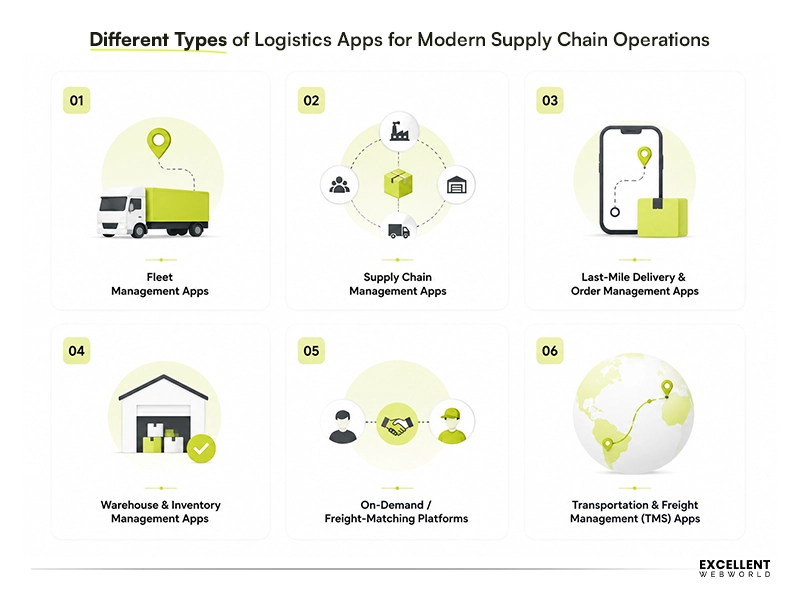 There are several types of logistics apps one can develop. They can be customized as per the industry’s requirements and objectives. Here are the popular types of logistics apps to help you get a better understanding:
1. Fleet Management Apps
The app answers your queries like where your vehicles are and whether they require maintenance. Samsara is a prime example of a fleet management app that combines live GPS tracking with vehicle diagnostics in just a single dashboard. What’s worth knowing before you scope this: predictive maintenance works best when IoT in logistics and supply chain provides accurate sensor data. Otherwise, its impact may be limited.
2. Supply Chain Management Apps
This is the broadest category and is ideal for enterprises as it connects procurement, inventory, and logistics. SAP’s Supply Chain Management suite is the most well-known enterprise reference point you can think of. Instead of using separate forecasts, a single AI model aligns inventory planning and fleet scheduling across teams.
3. Last-Mile Delivery & Order Management Apps
It includes everything from the customer-facing side of logistics. From order placed and order dispatched to order tracked and order delivered. Most of the use cases are in industries like eCommerce and food delivery. If you have heard of Onfleet, it’s one of the best referenced examples for last-mile delivery tracking.
What founders underestimate here? Having an inaccurate ETA damages more than a slightly longer one. So, tune your model for honesty over optimism, as we know that customers tolerate “40 minutes” more than a “20 minutes” that turns into 45, so tune the model for honesty over optimism.
4. Warehouse & Inventory Management Apps
This category digitizes what happens inside four walls. This includes stock counts, put-away, picking, and order fulfillment. For small-to-mid-sized operations that need inventory accuracy without a full enterprise warehouse management system, a perfect example would be Fishbowl Inventory.
5. On-Demand / Freight-Matching Platforms
These platforms are similar to a marketplace where available trucks and drivers are matched with shippers who need capacity. The most recognizable example of such an amazing pattern is Uber Freight. Here what noticing is that money and cargo both move fast and at volume, which makes fraud detection a functional necessity.
A similar approach can be seen in the AI Freight Forwarding Platform, we developed for HJM, where AI-based load matching connects shippers with suitable truckers based on reliability scores, preferences, and real-time logistics data.
6. Transportation & Freight Management (TMS) Apps
A freight management system is also known as TMS. It plans how freight moves. Moves as in which carrier, which route, which mode, like truck, rail, or air. And also tracks it in transit. Freight volumes and carrier options change hour to hour, which is exactly the kind of decision AI-based route and lane optimization is suited for.
The Technical Realities No Pitch Deck Tells You About
Every logistics app “looks simple” from the outside. It isn’t. This is where the real complexity actually lives, and it’s the same whether your team sits down the hall or across the world.
| What Gets Treated as Trivial | Why It Isn’t | The Question Your Team Needs to Answer |
|---|---|---|
| GPS tracking | Continuous tracking requires careful design. GPS drift and iOS background restrictions make it far from automatic. | How do we handle location accuracy loss and iOS background restrictions? |
| Maps & routing | Google Maps and Mapbox pricing scale with usage. Large fleets can generate significant monthly API costs. | What does our map/routing API bill look like at 10x today’s volume? |
| Internet connectivity | Field teams regularly lose network access. Offline support is essential for uninterrupted operations. | Is this built offline-first? How do actions queue locally and sync without conflicts? |
| Live tracking for many vehicles at once | Live updates depend on real-time infrastructure, which differs significantly from traditional application backends. | Has anyone on this team actually shipped real-time tracking at scale, or only smaller pilots? |
| Route optimization | The complexity starts when routes include traffic, multiple stops, and delivery time windows. | Are we building our own routing engine, or using an existing one (Google OR-Tools, Routific)? |
If your current team, whether it’s internal or external, can’t give clear answers to the right-hand column. Then be alert and consider that as your first red flag, regardless of who’s on the payroll.
What Actually Eats the Budget? It’s Operations, Not Features
Here’s something that almost no one has told first-time logistics founders: the hard part isn’t the happy path. It’s everything that goes wrong. Understand this: exceptions are the real product. A failed delivery, an unreachable customer, a driver breakdown, a mid-route vehicle swap, if the app only knows how to handle ‘order placed → order delivered,’ it’s a demo, not a business.
On an urban transport management platform we built, exception handling for driver breakdowns and mid-route swaps ended up being the single feature that determined whether dispatchers actually trusted the system. Addresses are messier than they seem, especially outside a handful of well-mapped Western cities. Systems that support pin drops, landmarks, and quick driver calls perform far better than those that expect clean, formatted addresses every time.
Field users aren’t your polished UI users either. They need one-handed navigation, large buttons, minimal typing, and screens that stay readable in direct sunlight, often on phones with cracked screens and unreliable connectivity. Proof of delivery through photos, signatures, or OTPs may seem simple in a demo. At scale, storing and retrieving millions of these records for dispute resolution becomes a real infrastructure cost, not a small implementation detail.
Here is what the internal team or vendor considers before anyone finalizes a spec:
- Did you map what happens when things go wrong?
- Do you know what proof-of-delivery storage will cost a year from now?
- Do you actually know how addresses work in the markets you are launching in?
- Has the driver-side app been tested one-handed, outdoors, in bright sunlight?
How AI Is Changing Logistics Operations Before Engineering Even Begins
This isn’t about what the software does once it’s built because that’s covered elsewhere. This is about how the conversation with a reliable development partner has changed before a single screen gets designed.
1. From Tracking Shipments to Predicting Delays
2 years ago, a discovery call for a logistics app opened with a query like “Could you show me where my truck is?” Now it opens with “Could you tell me before it’s going to be late?”.You see the difference? That’s a different brief entirely. It’s a display problem along with a modeling problem. Scoping conversations that don’t account for this difference tend to underestimate both the timeline and the data requirements.
2. From Manual Dispatching to Intelligent Recommendations
Operations teams already trust algorithmic suggestions everywhere else in their lives (Google Maps reroutes them without asking, and eCommerce sites recommend what to buy next). That same comfort has carried over into logistics: dispatchers running cloud-based dispatch software are expecting the system to suggest the next step. Vendors are still figuring out that building “manual-first, AI-later” is not what the buyer is demanding.
3. From Static Reports to Real-Time Operational Insights
Reporting used to mean a weekly or monthly export that someone reviewed after the fact. That cadence doesn’t match how operations teams make decisions now. The teams are asking for the same numbers live, feeding decisions as they happen, not summarized after the window to act has closed. One of the biggest scope risks is assuming reporting is retrospective when the client expects real-time insights.
Key Benefits of Logistics Software Development
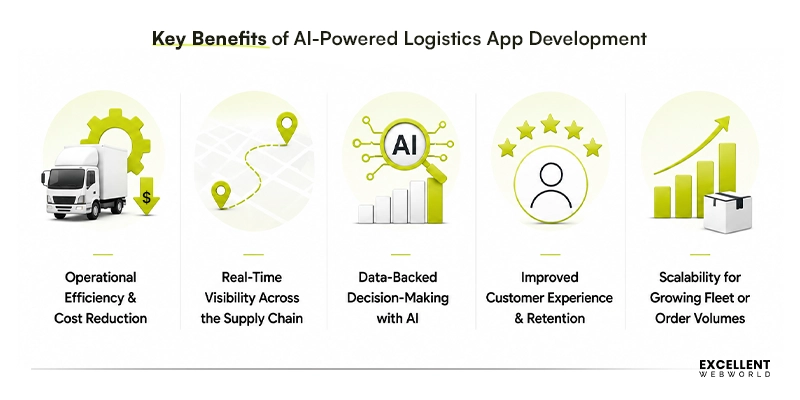
The benefits below aren’t unique to logistics software in the abstract. Most business software promises efficiency and visibility. What’s specific to logistics is how directly these translate into cost lines a founder or ops lead can point to.
1. Operational Efficiency & Cost Reduction
Every manual step in your operation is a place where time and money quietly leak out. A logistics app closes that gap by automating the handoffs. When I say manual step, it means a dispatcher calling a driver to confirm a pickup or a warehouse team updating stock on paper.
Example: We recently built a fleet management app for a mid-sized delivery fleet switching from phone-based dispatch to app-based assignment. The dispatcher workload dropped enough for the same team to handle 30–40% more daily orders.
2. Real-Time Visibility Across the Supply Chain
When your fleet data, warehouse stock, and order status live in 3 different tools, nobody has the full picture, not even you. One connected system means a delay in the warehouse shows up on the dispatcher’s screen the moment it happens.
Example: A 3PL running separate spreadsheets for inventory and delivery routing loses hours reconciling the two every week. A unified dashboard of logistics apps removes that reconciliation step entirely.
3. Data-Backed Decision-Making with AI
Decisions made on yesterday’s report are always one step behind. An app that surfaces live data lets a dispatcher reroute around a traffic jam as it forms, not after five customers have already called to ask where their order is.
Example: A route re-optimized mid-shift because of a live accident report can save a driver 20+ minutes on a single run, multiplied across a fleet, that adds up fast.
4. Improved Customer Experience & Retention
Customers don’t expect perfection; they expect to know what’s happening. An accurate ETA and a proactive delay notification prevent the support ticket from ever being filed. E
Example: eCommerce platforms that added proactive “your delivery is running 15 minutes late” notifications have seen a noticeable drop in support ticket volume around delivery status, simply because the customer already knew.
5. Scalability for Growing Fleet or Order Volumes
A process built around phone calls and spreadsheets breaks the moment you double your order volume; a well-built app doesn’t.
Example: a regional courier expanding from one city to 3 shouldn’t need to triple its dispatch team; the right fleet management technologies let order volume grow faster than headcount does.
Here are several statistics that help firms better understand the rise in popularity of this type of app and the benefits of investing in logistics app development:
- The surge in eCommerce has continued to drive demand. It is expected that by 2026, an estimated 4 million commercial warehouse robots will be in operation across 50,000 warehouses. This improves productivity and reduces costs by 20% to 40%
- Investments in logistics technology is on peak. By 2030, the digital logistics market size is anticipated to reach up to $77.52 billion, reflecting the ongoing digital transformation in the sector.
- The global logistics market will likely be worth USD 21.91 trillion by 2033.
Features Every Modern Logistics App Should Include
Modern logistics apps need more than basic tracking. These features help automate operations, improve visibility, and support faster, data-backed decisions.
1. Core Operational Features that Most of the Logistics Apps Carry
- GPS Tracking & Live Location: See every vehicle and shipment on a live map, updated in real time from pickup to delivery.
- Dispatch & Order Management: It assigns, reassigns, and tracks orders from a single dispatch view, with load planning built in rather than bolted on.
- Turn-by-Turn Navigation: Drivers get route guidance built into the same app they use for job assignments, so there’s no switching between tools mid-delivery.
- Warehouse & Inventory Sync: Stock levels update automatically as orders move, so your warehouse and delivery data never fall out of step.
- Load Planning: Load planning software optimizes how shipments are grouped and sequenced before they leave the warehouse, cutting wasted vehicle space and unnecessary trips.
- Payment & Invoicing Integration: Collect payments and generate invoices inside the same workflow, instead of exporting to a separate billing tool.
- Customer Notifications: Customers get status updates without calling support, from order confirmation through proof of delivery.
- Role-based Access Control: Drivers, dispatchers, and admins see only what their role needs, reducing accidental data exposure.
- End-to-End Encryption: Shipment details, customer records, and payment data stay encrypted in transit and at rest.
- Audit logs: Every fraud flag or dynamic pricing change is logged with a reason, so decisions can be reviewed and explained after the fact.
2. AI-Powered Features & Functionalities
- Demand Forecasting: It predicts inventory and order volume ahead of time using historical and seasonal order data.
- Predictive Maintenance: Flags vehicles likely to fail before a breakdown, powered by an IoT fleet management solution that flags vehicles likely to fail… based on telemetry and service history.
- Fraud Detection: Makes it easy to flag mismatched pickup/delivery details or anomalous account behavior in real time.
- AI Route Optimization: Recalculates the most efficient route continuously as traffic and conditions change.
- Dynamic Pricing: Easily adjusts delivery or freight pricing based on current demand and capacity.
- ETA Prediction: It estimates delivery windows from live traffic and driver pace, not a fixed distance-based average.
- Warehouse Automation: Warehouse automation technology uses computer vision and sensor data to handle stock checks and sorting with less manual labor.
- Driver Behavior Analytics: Scores braking, speeding, and idling patterns to catch risk before it becomes an incident.
3. AI Agent-Ready Capabilities
Most logistics apps today are built as dashboards that a person reads and acts on manually. “Agent-ready” means the app can also be acted on directly by an AI agent. That requires a few things that most current builds don’t have by default:
- Structured API development that an agent can call into
- Event-driven triggers, so an agent can react to a delay or exception automatically
- Permissioned action endpoints (an agent that can do something (rebook a shipment, notify a customer))
How has Logistics App Architecture Changed with AI?
Nowadays, most logistics apps built use a microservices architecture. That’s not new to logistics specifically, but it matters more here than in most software categories. API-first design ties these services together, and event-driven communication (a service reacting to something that happened, rather than polling for updates) keeps the whole system responsive instead of laggy.
AI doesn’t sit inside the same services as the rest of the app. It operates as a separate model serving layer that other components call when they need predictions. One of the biggest architectural decisions is choosing between real-time inference and batch processing. Fraud detection and route re-optimization require responses in milliseconds, so those models run live. Demand forecasting can run on a schedule, such as hourly or daily, without losing value. Getting this decision wrong is a common cost driver. Many teams build every AI feature for real-time inference, even when batch processing is enough, leading to higher infrastructure and maintenance costs.
| Layer | Technologies Used for Logistics App Development |
|---|---|
| Frontend | React Native, Flutter (cross-platform for driver/customer apps) |
| Backend | Node.js, Python (Django/FastAPI), Go |
| Database | PostgreSQL, MongoDB, Redis (for real-time data) |
| AI/ML | TensorFlow, PyTorch, cloud-native ML services (SageMaker, Vertex AI) |
| Cloud | AWS, Google Cloud, Microsoft Azure |
| Payments | Stripe, Adyen, regional processors |
| Messaging | Twilio, WhatsApp Business API, push notification services |
Build vs. Buy: Decide This on Paper, Not by Default
This decision matters just as much with an in-house team as with a vendor. In-house teams are just as prone to reinventing commodity infrastructure as agencies are, sometimes more, because “we can build it ourselves” is an easy trap when the team is already on payroll.
| Component | What I’d Do |
|---|---|
| Maps & routing | Buy (Google Maps Platform, Mapbox, or HERE) |
| Real-time tracking infrastructure | Build on top of a managed pub-sub/websocket service rather than building the transport layer from scratch |
| Payments | Buy (Stripe, Adyen, or a regional processor. Never build payment processing yourself) |
| Your actual workflow and exception logic | Build this yourself (it’s your actual product, and no vendor understands your operations better than you do) |
| SMS/OTP/WhatsApp | Buy (Twilio, MessageBird, a regional provider, or WhatsApp Business API) |
| Route optimization | Buy for MVP (Google OR-Tools, Routific, or an embedded SaaS engine) unless routing itself is your actual differentiation. |
If anyone, whether it be your internal team or external vendor, is proposing to build anything in the “buy” row from scratch, ask why. 9 times out of 10, that scope bloat dressed up as innovation.
In-House, Outsourced, or Hybrid: How Would You Actually Decide
This is the question most guides skip entirely, but we will now, as it’s one of the important ones, and it’s usually the first real decision you’ll make.
| Model | Where It Works Well | Where It Breaks Down | Cost Ranges |
|---|---|---|---|
| In-house | You have, or can hire, engineers with offline-first and live systems expertise, and logistics is central to your business. | Hiring takes time, staffing costs fluctuate, and teams may rebuild existing infrastructure unnecessarily. | Highest upfront (salaries, benefits, and hiring costs) |
| Outsourced | You need speed to a working MVP, or need specialized experience (offline sync, telematics) you don’t have internally | Knowledge walks out the door if the engagement ends; ongoing evolution needs a genuine long-term relationship, not a one-off project | Most affordable option for an MVP with $20,000–$90,000 range cost range, with costs increasing as complexity grows |
| Hybrid | Your team manages workflows while specialists deliver complex logistics engineering. | Needs a clear ownership line drawn upfront, or two teams end up assuming the other owns exception handling | Mid-range cost that combines specialized expertise with in-house product ownership. |
If you already have an in-house team, the honest question you can ask is the same one you’d ask a vendor. It would be “Have you personally shipped offline-first, real-time-tracking software before, or would this be the first time?” These questions help you choose the correct model, whether you need outside expertise for specific pieces while your team owns the rest.
How to Build a Logistics App with AI in Mind
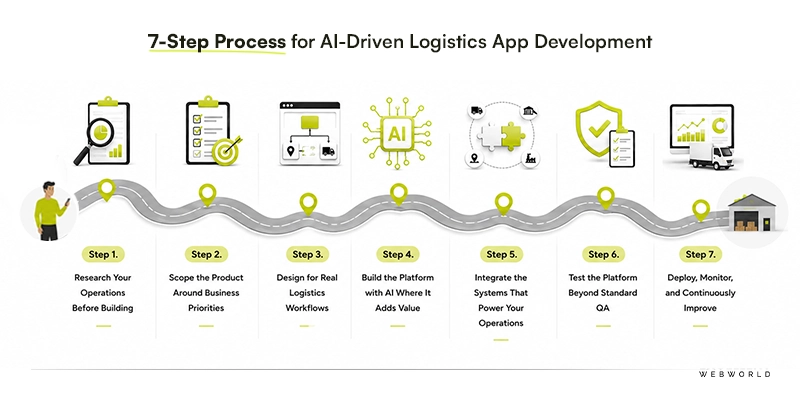 Some steps are AI-accelerated in a real, measurable way. Some steps are just talked about that way. Here’s the honest version of each.
| Steps | Timeline | Est. Cost |
|---|---|---|
| Research & Validation | 1–2 weeks | $2,000–$6,000 |
| Scoping | 1 week | $1,500–$4,000 |
| Design | 3–5 weeks | $8,000–$20,000 |
| Development | 8–16 weeks | $30,000–$120,000+ |
| Integrations | Runs parallel to development | Included above unless third-party licensing applies |
| Testing | 2–4 weeks | $5,000–$15,000 |
| Deployment & Handoff | 1–2 weeks | $3,000–$8,000 |
Step 1. Research (Faster with AI, Still Needs Validation)
Before anyone touches a wireframe, you need a real picture of the operation this app is going to run. That means looking past “we need tracking” and into specifics:
- Shipment volume by day, week, and peak season (a Q4 eCommerce spike behaves nothing like a steady B2B freight lane)
- Average delivery radius and service area density (a 5-mile urban last-mile operation and a 300-mile regional freight route need different architecture entirely)
- How many drivers or vehicles are you coordinating today? How many do you expect to be coordinating in 18 months?
- Where does your current process actually break? A missed pickup, a driver who can’t reach dispatch, a customer calling to ask “where is it” because the app doesn’t tell them
AI-assisted tools can speed up the competitor scan and the market-sizing part of this. What they can’t do is tell you where your operation specifically breaks; that only comes from watching a shift or talking to your dispatcher.
Ask your dispatcher and one driver, separately, “What’s the most annoying part of your day?” You will usually get your real feature priorities faster than from any competitor teardown.
Step 2. Scoping (Choosing Modules is a Business Call)
Take this scenario: a founder scopes v1 to include live tracking, AI route optimization, a driver app, a customer app, an admin dashboard, and analytics (all at once). Six months in, nothing has shipped, the budget is gone, and the one workflow that actually mattered still isn’t solid.
Scope by asking one question: which one would it be? Everything else waits. This is the same discipline behind building a strong MVP. A few things that make this call for you:
- Whether you run your own fleet or coordinate 3rd-party drivers
- Whether cash-on-delivery is part of your model
- Whether you are serving one region or several
Step 3. Design (AI Speeds Mockups, Not Dispatcher UX)
A logistics app has at least three very different users, and each one needs a different design conversation. So let’s break each one for you:
| User | Workflow | What Actually Matters |
|---|---|---|
| Driver | Receive assignment → Navigate → Update status → Capture proof of delivery | One-handed use, big buttons, readable in direct sunlight, and it works with a weak signal |
| Dispatcher | Monitor fleet → Spot a disruption → Reassign or re-route → Confirm resolution | Scannable at a glance during a live event |
| Customer | Place order → Track shipment → Receive updates → Confirm delivery | Accurate ETAs over optimistic ones |
If you opt for AI-assisted design tools, those are genuinely useful for generating a first-pass wireframe or testing a few directions quickly. What they’ll default to is usually wrong for the dispatcher screen specifically, where the right design is closer to “three numbers and one big button” during a disruption.
Step 4. Development (AI Scaffolds, Route Logic Is Manual)
Most of a logistics app’s development is well-trodden ground, and AI coding tools genuinely speed that part up. Then it hits route logic, and the pace changes. Here’s a real failure mode worth knowing before your team writes a line of code:
A route optimization feature that looks great in testing but ignores hours-of-service limits will happily schedule a driver for a route that’s technically illegal to complete.
That’s not a bug you catch with a demo, right? It’s a constraint that has to be built into the logic from the start, by an engineer who understands trucking regulations, not just routing algorithms. Here is the honest breakdown:
- Fast with AI Assistance: Auth, notifications, standard CRUD, admin dashboards
- Still Needs a Specialist: Route optimization within legal and operational constraints, real-time tracking infrastructure at scale, and dedicated AI development services for the forecasting and fraud models sitting on top.
Step 5. Integrations (Legacy Systems, Not AI, Run the Show)
Four systems need to talk to each other, and they don’t all cooperate equally:
- Maps & Routing APIs: Well-documented, usually the easiest integration on the list.
- Legacy TMS or WMS Systems: They have no modern API at all, which usually means custom middleware, not a plug-in.
- Payment Gateways: Straightforward for card payments, more work if COD is part of your model.
- Telematics Hardware: It varies by manufacturer; ask what’s already installed in your fleet before anyone quotes a timeline.
No AI tool shortcuts the legacy-system translation work. If a vendor’s estimate doesn’t ask which TMS or WMS you’re already running, that’s worth a follow-up question before you sign anything.
Step 6. Testing (AI Assists, Models Need Human Validation)
Different kinds of testing matter here, and they catch different things. Let’s check out each:
- Functional Testing: Order flow, dispatch, tracking, and delivery confirmation all work end-to-end
- Integration Testing: Maps, payments, telematics, and legacy systems actually stay in sync
- Performance Testing: The app holds up under peak load, not just a quiet demo environment
- Security Testing: Data encryption, access controls, and API endpoints hold up under scrutiny
- Model Validation: It needs a human running the route optimizer or fraud model against real edge cases
Automated testing covers the first four well. The fifth one doesn’t have a shortcut; it’s a different one. If nobody validates the model against a bad-weather scenario before launch, your first real storm becomes the test.
Step 7. Deployment (Maintaining Models, Not Just Uptime)
Make sure not to roll out to your full fleet or every region on day one. Start with one route, one region, or one warehouse. It’s enough real usage to catch what testing didn’t, without the blast radius of a full launch. Once it’s live, you need to:
- Track order completion time, delivery accuracy, and error logs live
- Get feedback from drivers and dispatchers directly
- Keep someone specifically responsible for the AI features post-launch
Set a retraining trigger before launch, not after. “When we add a new region” or “every quarter” is a real plan; “when it seems off” isn’t.
Your MVP Checklist: The Discipline That Actually Matters
The instinct every first-time logistics founder has is to build tracking, routing, payments, analytics, a driver app, and an admin dashboard all in version one. Don’t. This sinks more logistics projects than any bad technical decision, in-house or outsourced.
- Have you picked ONE workflow to take fully end-to-end before adding anything else?
- Have you modeled your API and infrastructure cost at 10x launch volume?
- Have you decided, in writing, what to build vs. buy?
- Has the field-user flow been tested outdoors with poor connectivity?
- Do you know exactly which data-protection regime applies to your first launch market?
- If cash or mobile money touches your flow anywhere, is there a three-way reconciliation ledger designed in?
- Has whoever is building this actually shipped offline-first, real-time tracking systems before?
- Does your data model treat exceptions as a first-class case?
How Much Does It Cost to Build a Logistics App?
The pitch you’ll hear a lot in 2026 is “AI makes it cheaper.” That’s only half true, and worth being precise about before you budget anything:
| Genuinely Shrinks With AI | Stays the Same or Grows |
|---|---|
| Boilerplate development time (auth, CRUD, standard screens) | Route logic and constraint-handling — still needs a specialist |
| First-draft design and research turnaround | Model training, data labeling, and ongoing inference cost |
| QA test-case generation | Model validation against real edge cases |
Net effect: Your logistics app development timeline shrinks, but a new, recurring cost category (model training and maintenance) shows up that a non-AI logistics app never had. Budget for both.
| Tier | Cost Range | What’s Included |
|---|---|---|
| Basic | $20,000 – $45,000 |
|
| Medium | $45,000 – $90,000 |
|
| Enterprise | $90,000 – $150,000 |
|
| AI-Powered Enterprise | $150,000 – $210,000+ |
|
The tier table above covers what you’re quoted. These are the costs that show up after, and they’re specific to the AI layer:
- Data Labeling & Model Training: Before a route optimizer or fraud model is useful, it needs historical data prepared and a model trained on it.
- Inference Compute: Every real-time prediction (an ETA, a fraud flag) costs something to run, and that cost scales with usage.
- Retraining Cadence: Route models need updates when service areas change, fraud models when new patterns emerge. Each retraining cycle has a real cost.
- Map & Traffic API Licensing: The same APIs that were cheap in testing get expensive once you’re tracking hundreds of vehicles pinging every few seconds.
The Money Conversation Nobody Has Upfront: Payments & COD by Region
Two categories of cost quietly scale with usage, not with your one-time build price: third-party API costs and cash-handling overhead, if cash-on-delivery is part of your model. Both look completely different depending on where you’re launching, which is exactly where generic cost advice falls apart, because it defaults to one market and calls it universal.
| Region | What People Actually Pay With | Does COD Still Matter? | What Happens If You Get This Wrong |
|---|---|---|---|
| USA | Card-first (Visa/Mastercard/Amex), Apple Pay/Google Pay, ACH for B2B | Rare outside informal contexts | You waste engineering time building a cash reconciliation nobody needs |
| Europe | Cards, plus local rails (iDEAL in the Netherlands, SEPA for B2B, BNPL like Klarna) | Low to moderate | You assume one payment stack covers the whole EU — it won’t |
| GCC | Cards and Apple Pay are dominant in urban UAE/Saudi Arabia, but cash is still meaningful for the last-mile | Moderate | You underbuild cash reconciliation between the driver, app, and bank deposit |
| Africa | Mobile money is the primary rail across much of the continent, not cards | High | You design a card-only flow and lock out most of your actual users |
| APAC | Fragmented: UPI in India, Alipay/WeChat Pay in China, GrabPay and e-wallets in Southeast Asia, cards in Japan/Australia/Korea | High in South/Southeast Asia, low in Japan/Korea/Australia | You treat “APAC” as one strategy when it’s really four or five |
If cash touches your flow anywhere, build a three-way ledger from the start:
- What the driver collected
- What the app recorded
- What actually landed in the bank.
Retrofitting this after launch is expensive, and it’s the single most common operational fire in delivery businesses, regardless of team size.
What Factors Influence the Logistics Software Development Cost and Post-Launch Expenses?
Build-phase cost is covered above. What isn’t covered yet is the cost that shows up after launch, which is usually the part that budgets miss entirely:
- Data Availability & Quality: Poor historical data means more cleanup work before any AI feature is usable, and ongoing correction after
- Third-party Integration Maintenance: APIs change, vendors deprecate endpoints, integrations aren’t a one-time cost; they need upkeep
- Real-time Infrastructure at Scale: Websocket/pub-sub costs scale with concurrent users, not with your original build estimate
- AI model Selection & Maintenance: Retraining cadence, drift monitoring, and inference compute are recurring line items, not launch-day costs
- Compliance Across Markets: Expanding to a new region can mean a new data-residency requirement, not just a translation update
The pattern across all five: these costs are usage-driven, not build-driven. A quote based only on development hours will look accurate at launch and wrong six months in.
Monetization Models for Logistics Apps
Here are the models that cover most of what’s actually in use, and which one fits depends more on your business type than on preference:
| Model | How It Works | Best Fit |
|---|---|---|
| Enterprise Licensing | One-time or annual licensing fee, often with custom SLAs | Large enterprises need dedicated infrastructure and support |
| Subscription-Based | Fixed monthly/annual fee for platform access | SaaS-style logistics tools sold to businesses (fleet management, WMS) |
| AI-Driven Premium Services | Paid tier for advanced AI features layered on a base product | Platforms offering predictive analytics, premium route optimization, or fraud-detection add-ons as an upsell |
| Marketplace Model | Commission on each transaction between shippers and carriers/drivers | Freight-matching and on-demand delivery platforms |
Logistics App Development Challenges in the AI Era (With Solutions)
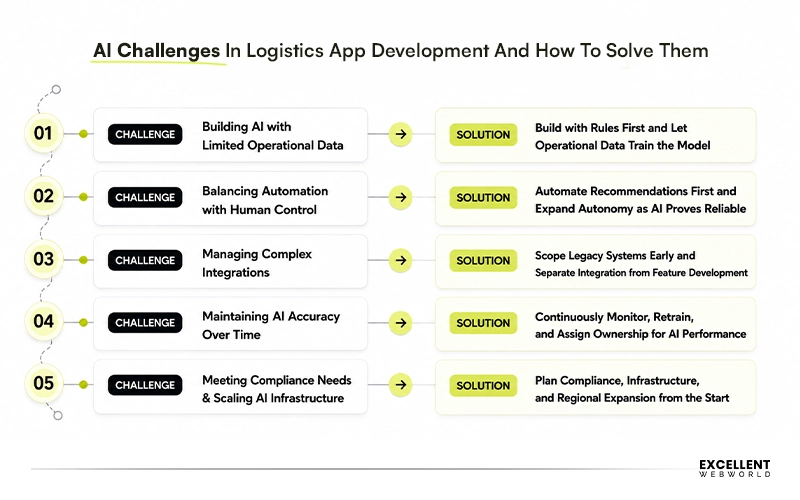
With so many benefits for AI-powered logistics apps, there come challenges as well. Understanding each early helps you reduce risk, control costs, and build a reliable platform.
1. Building AI with Limited Operational Data
A route optimizer or demand forecasting model needs historical data to be useful, and a new logistics operation, or one just digitizing from paper/spreadsheets, often doesn’t have enough.
Launch with rule-based logic first, and let the app collect clean operational data from day one. Treat the first 3–6 months as a data-collection phase, then introduce AI features once there’s enough real history to train on.
2. Balancing Automation with Human Control
Full automation sounds efficient until a model makes a call (a route, a fraud flag, a price change) that a dispatcher would have overridden with context the model didn’t have.
Design AI features as recommendations with an approval step by default, especially at launch. Move toward full automation only for the specific decisions where you’ve verified, over time, that the model’s judgment is reliably better than a human’s.
3. Managing Complex Integrations
Covered in depth earlier, legacy TMS/WMS systems, telematics hardware, and payment rails rarely cooperate out of the box.
Budget integration time separately from feature development, not as a line item inside it. Ask any vendor or internal team to name your specific legacy systems by name in their estimate; a generic “we’ll integrate with your systems” is a sign the work hasn’t been scoped yet.
4. Maintaining AI Accuracy Over Time
A model that’s accurate at launch drifts as operations change, and nothing in a standard uptime dashboard catches that.
Set a retraining cadence before launch, not after (the build steps above cover typical triggers per feature). Assign a specific owner for model performance, separate from whoever owns server uptime.
5. Meeting Compliance Needs & Scaling AI Infrastructure
Compliance requirements and infrastructure costs both scale with how many regions and how much volume you’re operating at.
Treat compliance and infrastructure scaling as part of your expansion plan, not an afterthought triggered by entering a new market. If India, the EU, or the GCC are on your roadmap, involve legal review before development starts there, not after.
Logistics Application Development Trends To Transform Your Operations
Technologies like GPS, AI/ML, Blockchain, and IoT have already significantly impacted these types of apps. Several firms are already implementing them in many innovative ways to provide users with more functionality. All logistics apps must incorporate the latest trends and use the latest technologies to thrive in this highly competitive market. Here are a few trends:
1. AI & ML
AI/ML is increasingly used to improve operational efficiency, reduce costs, and enhance decision-making. Key Applications: Predictive analytics, route optimization, demand forecasting, and warehouse automation.
2. IoT Integration
Implementing IoT in logistics is highly efficient for enhancing visibility, managing inventory control, and proactive maintenance, making it the chosen technology for many firms.
Key Applications: Real-time tracking of shipments, fleet management, and condition monitoring
3. Blockchain Technology
Blockchain technology is gaining popularity since it is highly efficient in improving trust, data security, and transaction efficiency.
Key Applications: Supply chain transparency, fraud prevention, and smart contracts for automating payments.
4. Cloud Computing
More firms are adopting cloud solutions for cost-effective scalability, real-time data sharing, and enhanced collaboration.
Key Applications: Centralized logistics management platforms, scalable infrastructure, and remote accessibility.
5. Big Data and Advanced Analytics
This is gaining popularity with an increase in the volume of data generated daily and the need for real-time analysis. It optimizes data-driven decision-making and enhances forecasting accuracy.
Key Applications: Customer behavior analysis, logistics network optimization, and risk management.
6. Digital Twins for Fleet Operations
A digital twin is a live virtual model of your fleet or warehouse, used to simulate changes before committing to them in the real world. It’s early for most mid-sized logistics operations, but it’s the direction enterprise fleet management is heading: testing decisions virtually before they incur real fuel or labor costs.
Key Applications: Fleet simulation, warehouse optimization, predictive maintenance, capacity planning, and scenario testing.
Is AI Enough to Build a Successful Logistics App?
No, and it’s worth being direct about why, rather than gesturing at it. AI coding tools and low-code platforms can genuinely get you to a working prototype fast. If you’re validating an idea, that’s real value — you can test whether people want the product before spending a real engineering budget. But a prototype and a production logistics app are different things. Here’s specifically where that gap shows up:
- Route Logic: AI can scaffold a routing feature; it doesn’t know your fleet’s hours-of-service constraints or delivery-window rules unless someone builds those in deliberately
- Exception Handling: A failed delivery, an unreachable customer, a mid-route vehicle swap, and the cases that don’t show up in a demo but define whether the app works in the real world.
- Compliance Work: Has to be correct; a generated consent flow that looks right in testing can still be legally wrong in a specific region.
- Offline-first Sync: Handling conflicting data when a driver’s phone reconnects after a dead zone is a genuinely hard distributed-systems problem, not a prompt.
This is where experienced logistics engineers still make a difference. not because they type code faster, but because they’ve already seen what breaks. They know a generated route optimizer needs hours-of-service constraints built in before it ever ships, because they’ve watched one get deployed without them.
That judgment doesn’t come from a better prompt. It comes from having built this specific category of software before and having watched it run in production with real drivers, real dead zones, and real exceptions.
Engineer Your Logistics App Around Your Business Needs
Building a logistics app in 2026 isn’t really a question of whether to use AI or not. It’s more about where AI adds value and where practical logistics expertise is ideal. You get that balance right, and you are equipped with a system that performs at its peak under real operational pressure.
That’s the exact problem our team has spent the last several years trying to solve. As a top logistics software development company recognized by Clutch & GoodFirms, we help logistics enterprises incorporate advanced tech like AI to future-proof their operations. Our logistics software development services are designed around a few things, which include.
- Real-Time Fleet Intelligence: Live visibility into every vehicle
- AI-Powered Route Optimization: Routing logic built around your fleet’s real constraints
- Predictive Delay Prevention: Catching a delay before it happens
- Unified Operations Dashboard: Single system for fleet, warehouse, and customer data instead of multiple disconnected tools
- MVP in 12 weeks, with dedicated project managers and global timezone coverage for teams
If you’re weighing whether to build this in-house, outsource it, or land somewhere in between, that’s a conversation worth having before any code gets written. We are here to be a part of your journey.
Frequently Asked Questions

Article By

