Chasing faster delivery and scalability is what enterprises are struggling with these days. Automation has been held up as the turnkey answer. Today, an agile software development lifecycle can’t run on hope and hand-stitched pipelines. It needs DevOps automation built for long-term impact on the business.
DevOps services are the game-changer anyway.
On top of that, DevOps automation transforms the pipeline. Code builds, tests, and provisions its own infrastructure, and deploys itself. That too, without a human babysitting each step. However, adopting automation tools doesn’t automatically create enterprise value.
Perforce’s 2026 State of DevOps report showcases that high-maturity organizations are 36% more likely to automate most of their deployments. Yet low-maturity ones remain 78% non-standardized, running on inconsistent and ad hoc processes even after adopting the same tools.
So the real decision for you isn’t whether to automate; it’s how you deploy DevOps automation: which stages to automate first, which tools to trust, and where AI genuinely helps versus where it doesn’t. That’s exactly what we’re talking about in this article.
What Is DevOps Automation?
The major benefit of executing DevOps automation in your software development lifecycle is speed and reliability. By automating repetitive tasks and preventing human errors. Moreover, this will free up the development and operations teams from manual handoffs and allow them to focus on the bigger-picture strategic work.
How Does DevOps Automation Work?
DevOps automation works to connect the dots of development, infrastructure, security, deployment, and operations into a single controlled & repeatable workflow. In your enterprise environments, this focuses on automating predictable work. While keeping the governance and human decision-making where actual business risk demands it.
| Stage | What happens | Enterprise value |
|---|---|---|
| Code → Build | A commit or pull request automatically triggers builds, dependency checks, and artifact creation. | Faster feedback with fewer manual handoffs. |
| Build → Test | Unit, integration, and regression tests run automatically before changes move forward. | Defects are caught earlier, and releases become more predictable. |
| Test → Security Gate | SAST, dependency, secrets, and quality checks run as part of the pipeline. | Security and compliance become delivery controls beforehand. |
| Infrastructure → Provision | Infrastructure as Code provisions consistent, version-controlled environments across development, staging, and production. | Less configuration drift and more reproducible infrastructure. |
| Deploy → Release | Validated artifacts move through controlled deployment workflows with approvals or gates where required. | Faster releases without removing production accountability. |
| Run → Monitor | Logs, metrics, traces, and alerts continuously monitor application and infrastructure health. | Problems become visible before they become major incidents. |
| Detect → Respond | Predefined actions such as rollback, scaling, or remediation can be triggered when conditions are met. | Reduced operational toil and faster recovery. |
| Observe → Improve | Pipeline and production data feed engineering decisions and optimization. | Continuous improvement based on measurable outcomes. |
What are the Benefits of DevOps Automation?
Without having a solid, ROI-led reason, an enterprise may reconsider adopting DevOps automation. So, here are the strong advantages you will experience with DevOps automation services in your business software.
Higher Deployment Frequency
Automated build, testing, and release workflows help teams move smaller changes into production more consistently. It’s even without adding the same level of manual effort.
Shorter Lead Time for Changes
By removing approval bottlenecks and repetitive handoffs where appropriate, automation shortens the path seamlessly. Therefore, it’s faster from a code change to a production-ready release.
Reduce Change Failure Rate
With automated testing, security checks, and deployment gates, issues are caught earlier. Hence, it reduces failed releases, rollbacks, and production disruption.
Faster Mean Time to Restore (MTTR)
The DevOps automation process performs continuous monitoring and predefined response workflows. This helps teams detect incidents sooner and restore services faster.
Lower Operational Cost
As it automates repetitive infrastructure, deployment, testing, and operational tasks, the engineering toil is reduced. Accordingly, this lets teams spend more time on higher-value work.
However, there are a few major kinds of secure DevOps Automation; each has its important base on the level of automation you demand.
The Core Types of DevOps Automation
When implementing the following DevOps practices across different engineering teams, here’s what I’ve learned: each type of DevOps automation maps to a specific DORA metric you’re already being measured against.
If your team is struggling with deployment frequency, lead time, MTTR, or change failure rate, the fix usually isn’t “more automation” generically. However, it’s the right type of automation for the specific bottleneck you’re hitting. Here’s how it breaks down.
1. CI/CD Pipelines (Continuous Integration & Continuous Delivery)
DevOps CI/CD automatically builds, tests, and deploys code changes the moment a developer commits to version control, replacing manual build-and-release cycles with a repeatable, always-on pipeline. This is the automation type with the most direct line to Deployment frequency, the DORA metric that tells you how often you’re actually shipping to production. In my experience, teams stuck at monthly or quarterly releases almost always have a CI/CD gap, not a talent gap.
2. Infrastructure as Code (IaC)
IaC replaces manual server configuration with version-controlled, declarative code that provisions cloud solutions and infrastructure consistently every time, without a human clicking through a console. This is where I’ve seen the biggest impact on change failure rate; when your infrastructure is defined in code and peer-reviewed like application code, you eliminate the “it worked on staging, why did prod break?” problem that comes from manually configured environments drifting apart.
3. Automated Testing
Automated testing runs unit, integration, and security checks continuously as part of the build process, catching defects before they reach a human reviewer, let alone production. This directly protects Lead Time for changes, the DORA metric measuring how long it takes code to go from commit to production. Every manual QA gate you remove from that path is time you get back, without sacrificing the confidence a real test suite gives you.
4. Configuration Management
Configuration management maintains a system’s intended state across every environment it runs in, continuously correcting for what Red Hat’s own engineering documentation calls “automation drift”: the silent, gradual divergence between what your infrastructure is supposed to look like and what it’s actually become after months of manual patches and one-off fixes. Moreover, it’s been observed that this exact drift causes outages that had nothing to do with a bad deployment and everything to do with an environment nobody had audited in months.
Well, this is a direct lever on Mean Time to Restore (MTTR) of secure DevOps automation solutions. It’s a consistently configured environment that is dramatically faster to diagnose and recover than one full of undocumented manual changes.
5. Monitoring & Observability
Monitoring and observability track system health, logs, and performance metrics in real time, giving your team the visibility to detect and respond to incidents before customers notice them. This is the automation type most directly tied to MTTR, and increasingly, it’s also where we see the clearest, most defensible AI application in the entire DevOps stack. It has AI-assisted anomaly detection and predictive alerting, moving observability from reactive (“something broke; now we investigate”) to proactive (“this metric pattern usually precedes a failure; here’s the alert before it happens”).
6. Security Automation (DevSecOps)
Security automation integrates vulnerability scanning, dependency checks, and compliance policy enforcement directly into the build pipeline, so security review happens continuously, not as a final gate that stalls a release. For enterprises in regulated industries, this is the automation type that enables fast Deployment Frequency and a strong change failure rate. So, these numbers are actually defensible to a compliance team.
What are the Top DevOps Automation Tools?
With working across the popular DevOps automation tools, the diversity of options confuses CTOs at large enterprises like yours. So, it’s better to evaluate them on the basis of what each one is, where it belongs in your stack, and which specific pain point it solves. Below are 5 tools that are the best-suited ones; they will get you covered for what’s actually breaking in most enterprise pipelines I’ve seen. You can explore the full-fledged list of DevOps automation tools in the blog.
| Tool | What It Is | Where It Fits | Best For (Industry/Use Case) | Where AI Is Being Layered In |
|---|---|---|---|---|
| GitHub Actions | A CI/CD automation platform built directly into GitHub, triggering builds, tests, and deployments on every commit, pull request, or scheduled event. | CI/CD Pipelines layer; the first automation type most teams implement. | Healthcare, Financial Services, Manufacturing, and Government are among GitHub’s own named enterprise verticals. Alongside SaaS and product teams already living in the GitHub ecosystem. | GitHub Copilot assists with authoring workflows, though not as a dedicated “auto-generate my pipeline” feature. |
| Jenkins | An open-source automation server that orchestrates build, test, and deployment pipelines through a highly configurable plugin ecosystem. | CI/CD Pipelines layer; the legacy-friendly alternative to GitHub Actions. | Enterprises with hybrid or on-prem infrastructure, complex multi-stage pipelines, or existing Jenkins investment not worth ripping out. | No confirmed AI capability yet, remains a traditional automation server. |
| Docker | A containerization platform that packages an application and its dependencies into a portable, consistent unit that runs identically across environments. | The foundation layer beneath CI/CD and orchestration. | 91% of the Fortune 100 already run on Docker, by Docker’s own count. So, the closest thing to a universal enterprise standard on this list. | This drives focus on agentic AI security;Gordon and Docker AI Governance isolate and govern autonomous coding agents. |
| Kubernetes | A container orchestration platform that automates deployment, scaling, and management of containerized applications across a cluster of machines. | Sits above Docker; it runs containers reliably at scale in production. | Verified by Kubernetes’ own case studies, including Babylon (healthcare/ML) and Booz Allen (government consulting)—enterprises needing self-healing, high-availability infrastructure. | No confirmed AI capability. The autoscaling (HPA/VPA) is metrics-based. |
| Terraform | An Infrastructure as Code tool that lets you define cloud infrastructure in version-controlled configuration files instead of manual console setup. | Infrastructure as Code layer—provisions the environment everything else runs on. | Enterprises running multi-cloud infrastructure across AWS Cloud, Azure, GCP, and Oracle Cloud, per HashiCorp’s own tutorial coverage. | HashiCorp’s Terraform MCP Server lets AI agents interact with workflows directly; connectivity, irrespective of auto-generated config. |
How to Deploy DevOps Automation: 8 Steps That Actually Hold Up in Production
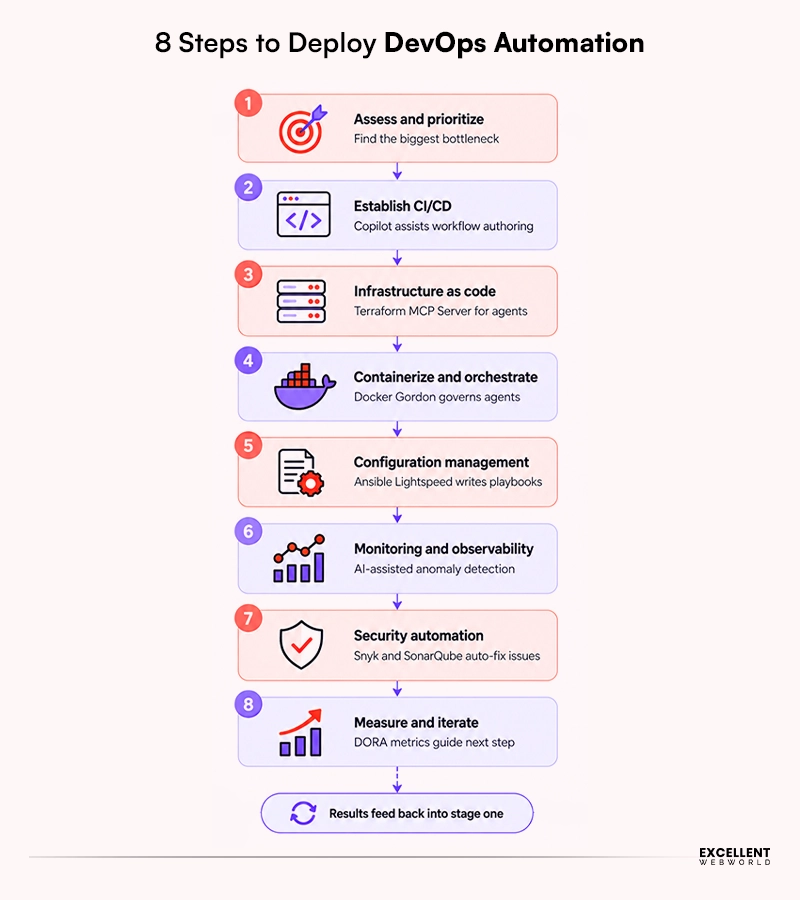
I’ve run this exact sequence with engineering teams more than once, and here’s the pattern I keep seeing: teams that jump straight to “let’s automate everything” burn months on tooling before they’ve automated the one thing actually costing them the most. The order matters as much as the tools.
Step 1: Assess & Prioritize [Find the Actual Bottleneck First]
Before automating anything, it’s crucial to map your current pipeline and identify where manual work is genuinely costing you. Either on slow releases, inconsistent environments, or incidents that take too long to resolve. Salesforce’s own DevOps guidance frames this correctly: automation succeeds when development and operations teams jointly identify which tasks are actually worth automating.
Step 2: Establish CI/CD Before Anything Else
Secondly, continuous integration and continuous delivery (CI/CD) form the backbone that every other automation layer sits on top of. The code changes should merge, test, and deploy automatically. This is the layer that most directly improves Deployment Frequency, the DORA metric most enterprises are actually measured against. So, start here with GitHub Actions or Jenkins. Moreover, it depends completely on whether you’re already GitHub-native or need deep on-prem customization.
Step 3: Move Infrastructure Into Code
Once deployments are automated, the next failure point is usually infrastructure drift. It’s an environment that’s been hand-configured so many times nobody can reproduce it. Infrastructure as Code, using Terraform, defines your servers, networks, and databases as version-controlled files. Accordingly, every environment is demonstrably identical, and every change is peer-reviewable before it ships.
Here’s the catch: This is where I’ve consistently seen the change failure rate drop the most. Because configuration errors get caught the same way code review catches application bugs.
Step 4: Containerize & Orchestrate for Consistency at Scale
Moving ahead, Docker eliminates the “works on my machine” problem by packaging an application with everything it needs to run identically everywhere. So, once you’re running enough containers, manual scaling and failure recovery become unmanageable. That’s where Kubernetes takes over; its self-healing behavior (restarting failed containers and automatically rescheduling workloads) directly improves Mean Time to Restore. So, many incidents resolve before a human is ever paged.
Step 5: Automate Configuration Management
Configuration management tools like Ansible or Puppet keep every environment in its intended state continuously. Additionally, it corrects the slow, silent drift that accumulates from one-off manual fixes. Salesforce’s DevOps documentation groups this specifically under Application Lifecycle Management. So, the goal isn’t a one-time setup; it’s continuous enforcement.
Step 6: Build In Monitoring & Observability [From Day One]
Once your pipeline is automated, you need automated visibility into whether it’s actually working. Prometheus (paired with Grafana) or Datadog tracks system health, logs, and performance in real time, catching issues before customers do. This is the layer where AI is genuinely earning its place right now. Yet, it’s through specific, real capability—the anomaly detection that flags unusual patterns before a static threshold alert would trigger.
Step 7: Layer in Security Automation [DevSecOps]
This adds up the security layer; DevSecOps means vulnerability scanning, dependency checks, and compliance enforcement. It runs continuously inside the pipeline, not as a final gate that stalls a release. This is what makes fast deployment frequency defensible to a compliance team. However, it’s very critical if you’re in finance, healthcare, or any regulated enterprise application.
Step 8: Measure, Iterate & Expand Automation Coverage
Automation isn’t a one-time project. According to Google’s own DORA research, teams with mature, automated pipelines run change failure rates around 5–15%, compared to 30–46% for heavily manual processes, but that gap only holds if you keep measuring it. Hence, revisit your DORA metrics regularly, and expand automation into the next bottleneck. So, once the current one is genuinely solved.
Real Challenges Enterprises Hit With DevOps Automation Service
I’ve seen every one of these firsthand; the tooling rarely fails first. It’s usually one of these six that trips teams up.
| Challenge | Why It Happens | How We Fix It |
|---|---|---|
| Automation drift | Environments silently diverge from their intended state after months of unlogged manual patches. | Enforce configuration management (Ansible/Puppet) as a continuous process, not a one-time setup. |
| Tool sprawl | Teams bolt on a new tool for every new problem instead of consolidating the pipeline. | Audit the full toolchain before adding anything new; most gaps are process gaps, not tool gaps. |
| Security lagging behind automation speed | Pipelines ship faster than compliance review can keep up. | Move scanning (Snyk, SonarQube) into the pipeline itself, not a pre-release gate. |
| Over-automating judgment calls | Teams automate steps that genuinely need human review, creating new risk instead of removing it. | Scope automation to rule-based, repeatable work, keeping humans on exceptions and edge cases. |
| Dev and Ops still working in silos | Automation gets built by one team without the other’s input, so adoption stalls. | Involve both teams in defining what gets automated before any tooling decision is made. |
| No way to prove ROI | Automation gets adopted without a baseline, so nobody can show it’s actually working. | Track DORA metrics before and after the four numbers make the business case for you. |
How Is AI Transforming DevOps Automation Solutions?
AI is shifting DevOps automation from executing predefined workflows to helping teams understand, predict, and respond to operational events. This is where AIOps becomes relevant, but I see it as an intelligence layer on top of established automation. (Don’t misinterpret it as a replacement for CI/CD, IaC, or observability.)
Smarter anomaly detection
AI can analyze operational signals to identify unusual behavior and surface potential issues earlier. So, it’s helping teams move from reactive monitoring toward proactive operations.
Faster incident investigation
As AI can correlate logs, processes, infrastructure context, and deployment history, this helps DevOps Automation engineers form a more targeted root-cause hypothesis. It frees them from manually reviewing disconnected signals.
AI-assisted remediation
AI can recommend configuration changes, infrastructure commands, or corrective actions. Thus, for production environments, I recommend approval-gated execution rather than unrestricted autonomous changes.
Less operational toil
Natural-language commands, AI-assisted troubleshooting, and automated routine operations. Hence, it can reduce the time engineers spend on repetitive infrastructure work.
DevOps Automation: The Enterprise Way Forward
DevOps automation + AI is about making production operations faster, more predictable, and more resilient. Enterprises should first automate repeatable workflows, establish the controls to govern them, and then apply AI. Particularly, where human analysis slows detection, diagnosis, and remediation.
So, the goal is reliable automation that scales with confidence. When automation, AI, observability, and governance work together, DevOps becomes more than a delivery practice. It becomes a foundation for continuous production reliability, faster recovery, and measurable operational performance. Excellent WebWorld helps enterprises turn this approach into reality with DevOps automation consulting built around AI and production-ready governance.
Frequently Asked Questions
Honestly, there isn’t a single “best” one; it depends on which stage of the pipeline you’re improving. GitHub Copilot helps write CI/CD workflows, and Ansible Lightspeed generates configuration playbooks from plain English. In contrast, Docker’s Gordon governs AI agents running in containers. For security, Snyk and SonarQube both use AI to auto-generate fix suggestions for vulnerabilities. So, the right choice is the one that fits the specific bottleneck you’re solving, unlikely to pick the most hyped tool on the market.
Most of the core tools are GitHub Actions, Jenkins, Docker, Kubernetes, and Terraform. And these are free and open-source. You’re paying for infrastructure, engineering time, and optional managed/AI add-ons, not framework licensing. That said, here’s a rough enterprise budgeting range based on typical implementation scope:
- Foundational setup (CI/CD + IaC): $15,000–$40,000
- Full pipeline (adds containerization + monitoring): $40,000–$120,000
- Enterprise-wide (legacy migration + security + compliance): $120,000–$300,000+
Moreover, you can expect the ongoing costs, on top of any of these, to typically run 15–25% of the initial build. It’s annual for maintenance, monitoring tool subscriptions, and continued optimization. So, these ranges assume a mid-to-large enterprise engagement.

Article By


Mayur Panchal is the CTO of Excellent Webworld. With his skills and expertise, He stays updated with industry trends and utilizes his technical expertise to address problems faced by entrepreneurs and startup owners.