Enterprise Automation At A Glance
- Enterprise automation delivers value when it connects business processes, enterprise data, applications, and workflows, not when it automates isolated tasks.
- The right automation technology depends on process complexity, decision-making requirements, integration needs, and the level of human oversight required.
- A scalable architecture needs reliable APIs, accessible data, workflow orchestration, and governance built in from the start.
- AI agents suit dynamic, multi-step tasks, but predictable, rule-based processes often work better with conventional automation.
- Consider custom enterprise automation when off-the-shelf platforms cannot accommodate complex workflows, specialized integrations, or business-specific requirements.
- When automation affects critical business operations, it must include security, access controls, audit trails, exception handling, and human approval.
- The most effective approach starts with high-impact processes, measures business outcomes, and expands automation based on proven results rather than technology adoption alone.
Enterprise automation uses workflows, integration, software, RPA, AI, and AI agents to automate business processes across various departments and enterprise systems.
Modern-day enterprise automation comprises:
- Business Process Automation
- Robotic Process Automation (RPA) Services
- Workflow and BPM
- Integration and iPaaS
- Intelligent Automation
- Document Automation
- AI-Powered Automation
- Hyperautomation
- Agentic Automation
Choosing the right technology determines your automation project's success, and the right choice depends on your business process.
While RPA is better suited for structured, screen-based work, integration platforms are useful for connecting various systems through APIs; process platforms can manage workflows and human approvals with utmost efficiency; and AI agents can extend automation to dynamic, multi-step workflows.
The most effective enterprise automation programs don’t begin with a tool. They begin with business processes, systems involved, data, exceptions, human decisions, security requirements, and measurable business outcomes.
In this blog, I will decode the nitty-gritty of enterprise automation, i.e., types, tools, architecture, use cases, role of AI agents, ROI, governance, and how to choose the right platform for your business. But first, let’s start with the fundamental question…
What is Enterprise Automation?
Enterprise automation uses workflows, software, artificial intelligence, integrations, and automation technologies to execute business processes with minimal human intervention across an organization.
Unlike a simple automation task, enterprise automation can coordinate multiple activities across departments, databases, employees, applications, and external systems.
For example, an automated accounts-payable workflow can:
- Receive an invoice.
- Extract invoice information.
- Validate supplier and purchase-order data.
- Check business rules.
- Identify exceptions.
- Route exceptions for approval.
- Update the ERP.
- Trigger payment.
- Record the transaction for auditing.
This single process comprises APIs, workflow automation, document AI, RPA, business rules, human approval, and enterprise software.
Enterprise Automation vs. Task Automation
| Task Automation | Enterprise Automation |
| Automates an individual task | Automates an end-to-end process |
| Usually team-specific | Can span multiple departments |
| Often isolated | Connects multiple systems |
| Usually rule-based | Can combine rules, AI, and agents |
| Limited business context | Uses enterprise data and context |
| Task-level measurement | Business-level measurement |
| Simple governance | Requires security, access, monitoring & governance |
The objective isn't necessarily to eliminate human intervention. The objective is to determine which part of a business process people, software, deterministic automation, AI, or AI agents should handle.
How Enterprise Automation Has Evolved
Enterprise automation has evolved over the years through several overlapping generations:
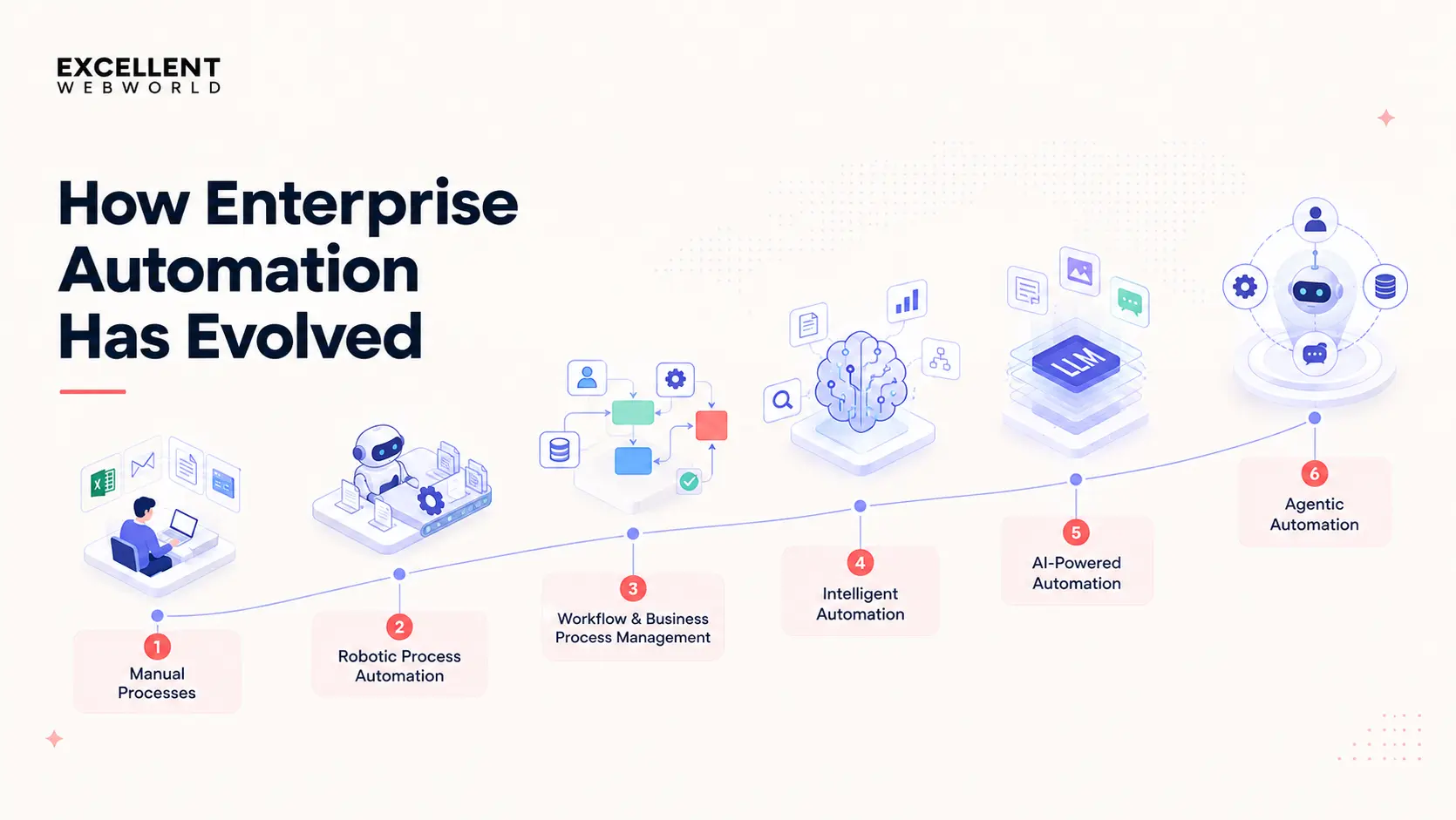
1. Manual Processes
Employees perform repetitive tasks using spreadsheets, email, documents, and business applications.
2. Robotic Process Automation
RPA uses software robots to execute structured, repetitive tasks based on predefined rules.
Typical examples include:
- Data Entry
- Invoice Processing
- Reconciliation
- Report Generation
- System Updates
- Data Migration
3. Workflow and Business Process Management
Business Process Management (BPM) Services and workflow platforms connect individual tasks into a structured process comprising people, systems, approvals, and business rules.
4. Intelligent Automation
AI and machine learning add capabilities such as:
- Document Understanding
- Classification
- Prediction
- Natural-Language Processing
- Anomaly Detection
- Decision Support
5. AI-Powered Automation
Generative AI development services and LLMs enable automation systems to work with unstructured data such as:
- Emails
- Documents
- Conversations
- Knowledge Bases
- Natural-Language Requests
6. Agentic Automation
AI agent extends automation into more dynamic workflows.
Rather than following a fixed sequence, an agent can understand a goal and decide the next course of action, interact with enterprise systems, and escalate decisions when human intervention is needed.
The evolution can be summarized as:
Manual → RPA → Workflow → Intelligent Automation → AI Automation → Agentic Automation
These technologies are complementary, not mutually exclusive.
What are the Types of Enterprise Automation?
Enterprise automation is not a standalone technology; it’s an ecosystem of automation approaches.
1. Business Process Automation
Business Process Automation (BPA) automates defined processes end-to-end.
Some typical examples include:
- Customer Onboarding
- Purchase Approvals
- Order Processing
- Employee Onboarding
- Claims Processing
- Invoice Workflows
BPA focuses on outcomes rather than process steps, instead of automating one isolated task.
2. Robotic Process Automation
RPA uses software robots to perform repetitive tasks through user interfaces and applications.
RPA works particularly well when:
- Inputs are structured
- Rules are predictable
- Processes are repetitive
- Existing applications lack usable APIs
Typical use cases comprise legacy application workflows, reconciliation, data migration, and invoice entry.
3. Business Process Management
Business Process Management (BPM) emphasizes designing, executing, monitoring, and improving business processes.
BPM is useful when processes have:
- Multiple Stages
- Approvals
- Business Rules
- Human Decisions
- SLAs
- Exceptions
- Long-Running Cases
4. Workflow Automation
Workflow automation connects predefined actions into a sequence.
For example:
Lead received → Qualification → CRM update → Sales assignment → Follow-up
Workflow automation is typically more structured compared to agentic automation because the sequence is defined in advance.
5. Intelligent Automation
Intelligent automation combines automation with AI and machine learning services.
It can support tasks such as:
- Classification
- Prediction
- Document Understanding
- Natural Language
- Anomaly Detection
- Decision Support
6. Document Automation
Document automation utilizes technologies such as computer vision, NLP, OCR, machine learning, and generative AI to process business documents.
Examples comprises:
- Invoices
- Contracts
- Purchase Orders
- Claims
- Applications
- Financial Statements
- Medical Documents
7. Integration Automation
Integration automation connects applications and data sources.
Common mechanisms include:
- APIs
- Webhooks
- Event Streams
- Middleware
- iPaaS
- Custom Integrations
Example:
CRM → Order Management → ERP → Payment → Customer Notification
8. Data Automation
Data automation manages recurring data operations without any manual intervention.
It can automate:
- Data Ingestion
- Data Validation
- Data Transformation
- Data Synchronization
- Data Pipelines
- Reporting
- Data Quality Checks
9. AI-Powered Automation
AI-powered automation brings artificial intelligence into business workflows that require generation, classification, interpretation, prediction, or contextual decision-making.
Examples include:
- Email Classification
- AI Document Processing
- Customer Intent Detection
- Natural-Language Reporting
- AI-Assisted Claims Processing
- Automated Knowledge Retrieval
10. Hyperautomation
Hyperautomation combines multiple automation technologies across an organization’s processes.
A hyperautomation program may combine:
RPA + BPM + APIs + AI + analytics + process mining + AI agents
The focus isn't on one automation; it’s on systematically identifying and automating processes across the enterprise.
11. Agentic Automation
Agentic automation utilizes AI agents to perform goal-driven, multi-step workflows.
An agent may:
- Interpret a Goal
- Gather Information
- Plan Actions
- Use Tools
- Call APIs
- Retrieve Enterprise Data
- Execute Workflows
- Verify Results
- Escalate Exceptions
Agentic automation is particularly relevant for processes where the objective is crystal clear, but the execution path may vary.
The Five Categories of Enterprise Automation Tools
You should not evaluate enterprise automation tools as one flat list.
A platform designed specifically for legacy screen automation solves a different problem from an API integration platform. A case management platform solves a different problem from a developer workflow tool.
| Category | What It Automates | Typical Use |
|---|---|---|
| RPA & UI Automation | Screen-based & legacy application work | Data entry, legacy ERP workflows |
| Integration & iPaaS | System-to-system data & events | API integrations, data synchronization |
| Low-Code Process Platforms | Workflows, approvals, cases | Claims, onboarding, complex processes |
| ITSM & Service Workflow | Service requests & operational workflows | IT, HR, employee services |
| Developer Workflow Tools | Code-driven & engineering-owned automation | Internal tools, custom workflows, integrations |
RPA & UI automation
RPA is useful when automation needs to interact with applications through user interfaces.
This makes RPA relevant for:
- Legacy Applications
- Desktop Software
- Partner Portals
- Systems Without Usable APIs
The trade-off is maintenance. Changes to application interfaces can also affect bot performance.
Integration & iPaaS
Integration platforms connect systems using connectors, APIs, and events.
This makes it highly suitable for:
- SaaS-to-SaaS Integration
- ERP/CRM Synchronization
- High-Volume Data Movement
- Event-Driven Processes
Low-Code Process Platforms
These platforms manage workflows comprising:
- Approvals
- Cases
- Business Rules
- Human Decisions
- Long-Running Processes
ITSM & Service Workflow Platforms
These platforms are designed around service requests.
Examples include:
- IT Incidents
- Access Requests
- Employee Requests
- Provisioning
- Facilities Workflows
Developer Workflow Tools
Developer-oriented platforms provide engineering teams more control over:
- Code
- Version Control
- Custom Logic
- Deployment
- Self-Hosting
- APIs
The category framework is more useful than simply asking which automation platform is the “best.” The right category depends on your systems, processes, ownership model and technical constraints.
11 Enterprise Automation Tools Compared
The following table discusses different categories of the enterprise automation market. Evaluate them by use case rather than treating them as interchangeable products.
| Tool | Category | Common Fit | Key Consideration |
|---|---|---|---|
| Microsoft Power Automate | Workflow + RPA | Microsoft-centric organizations | Strong fit with Microsoft 365 and Dynamics |
| UiPath | RPA + automation | Large RPA programs | Broad automation and orchestration capabilities |
| Automation Anywhere | RPA + AI automation | Enterprise RPA programs | Combines bots, AI, and process automation |
| SS&C Blue Prism | RPA | Governed enterprise automation | Strong focus on controlled digital workers |
| Pega Platform | Process + case management | Complex business processes | Strong for rules-heavy, long-running cases |
| Appian | Low-code process automation | Process applications | Combines process, data, RPA, and document capabilities |
| ServiceNow | ITSM + workflow | IT and employee workflows | Strong when ServiceNow is already central to operations |
| Workato | iPaaS | Integration-led automation | Useful for connecting cloud and enterprise systems |
| MuleSoft Anypoint Platform | iPaaS + API management | Complex integration estates | Strong API-led integration approach |
| n8n | Developer workflow | Engineering-owned automation | Code flexibility and self-hosting |
| Zapier | SaaS automation | Department-level automation | Fast no-code application connectivity |
These platforms cover different automation needs, from RPA and workflow orchestration to API integration and developer-owned automation.
How the Tools Map to Business Needs
Here’s how you can choose the appropriate automation tools/platforms based on your specific business requirements:
| Business requirement | Category to evaluate | Example platforms |
|---|---|---|
| Automate a legacy application | RPA | UiPath, Automation Anywhere, Blue Prism |
| Connect multiple SaaS systems | iPaaS | Workato, MuleSoft |
| Automate Microsoft workflows | Workflow + RPA | Power Automate |
| Manage long-running cases | Process automation | Pega, Appian |
| Automate IT requests | ITSM workflow | ServiceNow |
| Build engineering-owned workflows | Developer workflow | n8n |
| Automate departmental SaaS tasks | No-code automation | Zapier |
| Process complex documents | Intelligent automation | UiPath, Automation Anywhere, Appian |
| Build custom automation logic | Developer/platform approach | n8n, custom engineering |
Note: Tool selection should always start by looking at the process, not the vendor.
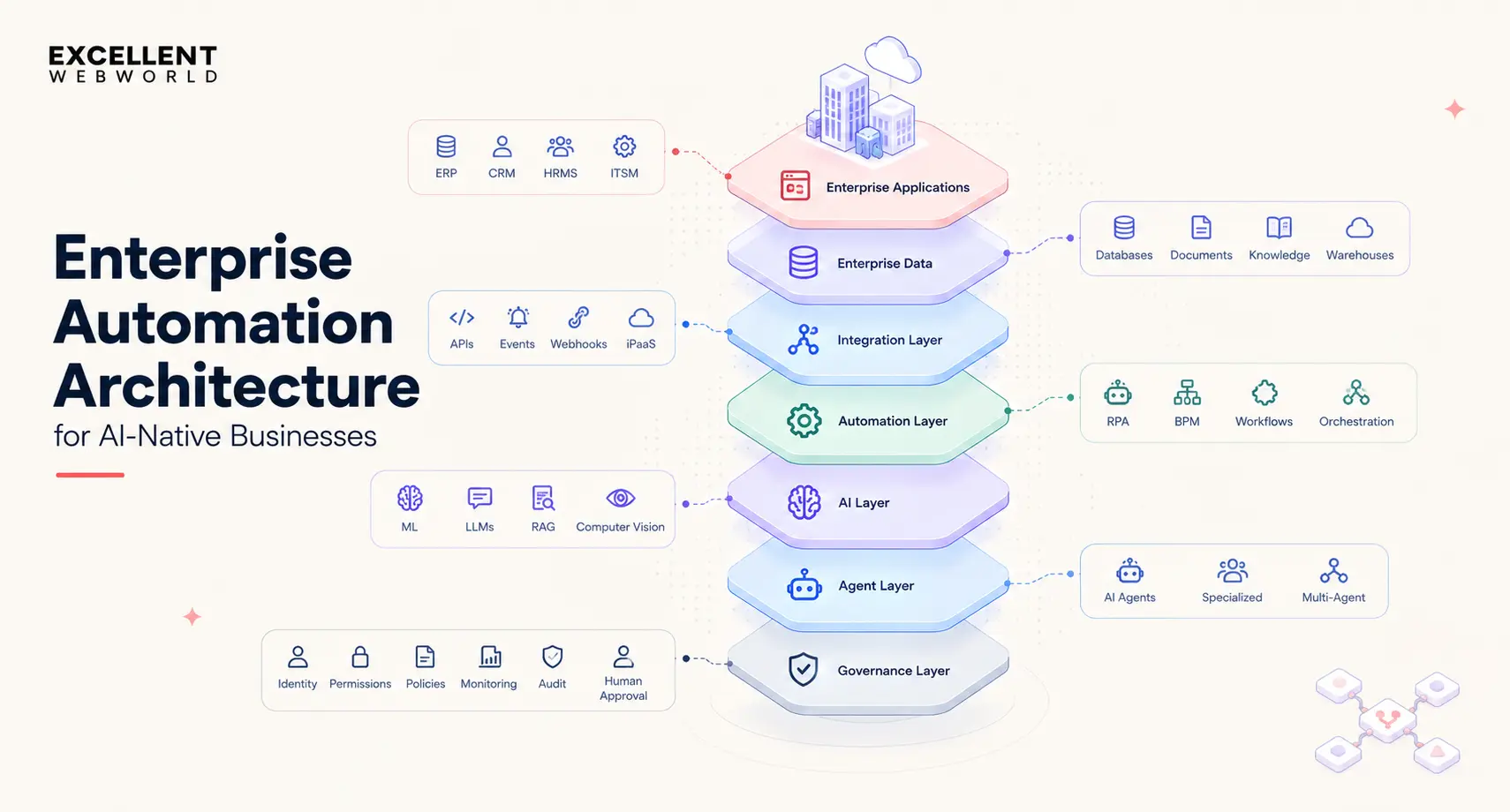
Enterprise Automation Architecture
A modern enterprise automation architecture comprises several layers:
| Layer | Purpose | Examples |
|---|---|---|
| Business systems | Run core operations | ERP, CRM, HRMS, ITSM |
| Data | Provide business context | Databases, warehouses, documents |
| Integration | Connect systems | APIs, events, iPaaS |
| Automation | Execute workflows | RPA, BPM, orchestration |
| AI | Handle cognitive tasks | ML, Enterprise LLMs, NLP, vision |
| Agents | Execute goals dynamically | AI agents, multi-agent systems |
| Governance | Control and monitor | IAM, audit, security, observability |
A more simplified architecture is:
Enterprise systems → Data → Integration → Automation → AI → Agents → Governance
These layers can interact with each other in both directions. For example, an AI agent might fetch information from a database, call an API, trigger an RPA bot, update CRM details, and request human approval before completing the whole transaction.
Enterprise Automation Technologies
Here are the key enterprise automation technologies that you should be aware of:
| Enterprise Automation Technology | Best Suited For |
|---|---|
| RPA | Deterministic, repetitive, structured work. |
| APIs & integrations | Reliable system-to-system communication. |
| BPM & workflow engines | Orchestrating people, systems, approvals, and business rules. |
| Machine learning | Prediction, classification, anomaly detection, and optimization. |
| Large language models | Natural-language and unstructured information tasks. |
| Retrieval-Augmented Generation | Grounding AI systems in enterprise knowledge. |
| Computer vision solutions | Visual and document-based information. |
| AI agents | Dynamic, multi-step, goal-oriented processes. |
Note: Over the years, I’ve seen that the strongest automation architectures combine these technologies for specific use cases instead of forcing every business process into a single platform.
Enterprise Automation Use Cases by Function
Here are the enterprise automation use cases that you should be aware of:
Finance & Accounts Payable
Automation can handle:
- Invoice Capture
- Data Extraction
- Purchase-Order Matching
- Approval Routing
- Reconciliation
- ERP Updates
- Payment Workflows
- Financial Reporting
A typical architecture is:
Invoice → Document AI → Validation → Business rules → Approval → ERP → Payment
Sales
Sales automation can support:
- Lead Qualification
- Lead Routing
- CRM Updates
- Meeting Scheduling
- Proposal Generation
- Follow-Up
- Sales Reporting
Customer Service
Automation can support:
- Ticket Classification
- Intent Detection
- Knowledge Retrieval
- Response Generation
- Case Routing
- Status Updates
- Escalation
AI customer service agents can extend these into end-to-end requests that require multiple system interactions.
IT Operations
Common use cases include:
- Incident Classification
- Password Resets
- Access Requests
- User Provisioning
- Infrastructure Workflows
- Service Requests
- Monitoring
- Security Operations
HR
HR automation can handle:
- Employee Onboarding
- Document Collection
- HR Requests
- Payroll Workflows
- Employee Support
- Offboarding
- System Provisioning
Supply Chain & Procurement
Automation can support:
- Supplier Onboarding
- Purchase Orders
- Inventory Updates
- Shipment Tracking
- Procurement Approvals
- Freight Invoice Processing
- Demand Forecasting
Healthcare
Healthcare automation can support:
- Claims Processing
- Patient Onboarding
- Documentation
- Eligibility Verification
- Prior Authorization
- Appointment Workflows
- Administrative Communication
Keep in mind that any healthcare implementation will require additional consideration of interoperability, privacy, security, and regulatory requirements.
We partnered with FerMD to build an AI-powered telemedicine marketplace connecting patients, healthcare providers, pharmacies, laboratories, and imaging services. The key challenge was coordinating these interconnected services without relying on disconnected, manual processes at every step.
We addressed this through enterprise workflow automation, connecting patient intake, provider matching, prescription routing, lab-order coordination, and follow-up workflows within a unified platform. This approach resulted in 68% faster care coordination, 2.3× faster patient routing, and 99.9% platform uptime.
Manufacturing
Common applications include:
- Production Workflows
- Quality Inspection
- Predictive Maintenance
- Inventory Management
- Supplier Workflows
- Production Reporting
Government
Government automation can support:
- Application Processing
- Document Workflows
- Case Management
- Citizen Services
- Administrative Processes
- Compliance Reporting
Enterprise Automation Use Cases by Process
Here are the enterprise automation use cases by process that you should keep in mind:
| Process | Complexity | Typical automation approach |
|---|---|---|
| Invoice Processing | Medium | Document AI + RPA/API + workflow |
| Order Synchronization | Medium | APIs + iPaaS |
| Claims Processing | High | BPM + AI + human review |
| Employee Onboarding | Medium | Workflow + integrations + RPA |
| IT Access Requests | Low–Medium | ITSM + workflow |
| Customer Support | Medium–High | AI + RAG + workflow/agents |
| Procurement | Medium–High | Workflow + integrations + AI |
| Legacy Data Entry | Low–Medium | RPA |
| Complex Knowledge Work | High | AI + agents + human oversight |
RPA vs. AI Automation vs. Agentic AI
Here is a parameter-based comparison of RPA, AI automation, and agentic AI to help you choose the best option for your business needs.
| Capability | RPA | AI Automation | Agentic AI |
|---|---|---|---|
| Execution | Rule-based | AI-assisted | Goal-driven |
| Workflow | Predefined | Mostly predefined | Dynamically planned |
| Inputs | Structured | Structured + unstructured | Highly variable |
| Decision-making | Limited | AI-assisted | Contextual |
| Adaptability | Low | Medium | High |
| Best suited for | Repetitive tasks | Cognitive tasks | Complex multi-step work |
| Human involvement | Optional | Often useful | Usually important for exceptions/high-impact actions |
When should you use RPA?
You should use RPA when:
- The process is repetitive
- Rules are clear
- Inputs are structured
- Systems lack usable APIs
When should you use AI automation?
You should use AI automation when a business process requires:
- Document understanding
- Classification
- Prediction
- Natural-language processing
- Content generation
When should you use agentic AI?
You should use AI agents when:
- The goal is clear
- The exact steps can vary
- Multiple systems must be used
- Contextual decisions are required
- Exceptions are common
You can also combine these technologies to get the best of both worlds and create a win-win situation for your business.
Here’s what a typical workflow would look like:
Agent → determines what needs to happen → API/RPA/workflow → executes the action
How AI Agents are Changing Enterprise Automation
Traditional automation starts with a predefined workflow, while agentic automation starts with an end goal.
For example:
Traditional automation
New customer → Verify documents → Create account → Send confirmation.
Agentic automation
Goal: Complete customer onboarding
The AI agent can:
- Review customer information.
- Determine required documents.
- Retrieve available information.
- Identify missing information.
- Validate documents.
- Call the appropriate APIs.
- Update the CRM.
- Request approval where required.
- Notify the customer.
- Record the outcome.
Components of an Enterprise AI Agent
Here are the key components of an enterprise AI agent that you should be aware of:
| Component | Role |
|---|---|
| Goal | Defines the desired outcome |
| Context | Provides business information |
| Reasoning | Interprets the situation |
| Planning | Determines next steps |
| Tools | APIs, databases, RPA, search |
| Execution | Performs actions |
| Verification | Checks results |
| Escalation | Transfers decisions to humans |
The key point is that agentic automation shouldn’t replace deterministic automation anywhere.
A robust architecture in that sense would be something like:
Rules for predictable decisions + APIs for system actions + RPA for legacy systems + AI for interpretation + agents for dynamic orchestration + humans for exceptions and high-impact decisions.
How to Choose the Right Enterprise Automation Platform
Start by understanding the processes, systems, and decisions the platform must handle. Define these requirements first to narrow down suitable platforms before evaluating vendors, comparing features, or attending demos.
Step 1: Understand the Systems Involved
You should identify the applications, databases, and external systems involved in the process. It helps you determine integration requirements and whether the platform can work with the existing infrastructure.
At this stage, you should ask:
- Which applications does the process use?
- Do these applications support APIs?
- Does the process rely on legacy systems?
- Where is the required data stored?
- Does the workflow involve external systems or partner portals?
Step 2: Understand Process Variation
Evaluate input formats, transaction volumes, and exception frequency to determine how much flexibility automation needs and whether rule-based automation or AI is a better fit.
At this stage, you should ask:
- How many transactions does the process handle?
- How frequently do transactions occur?
- How many input formats must the platform support?
- How often do exceptions occur?
- How predictable are the process steps and outcomes?
Step 3: Identify Human Decision
Decide which tasks can run automatically and which require human intervention. It will help you establish escalation rules, approval requirements, and boundaries for AI-driven decisions.
At this stage, you should determine:
- Where is human approval required?
- Which decisions require human judgment?
- Which decisions can be automated safely?
- What happens when AI confidence is low or an exception occurs?
Step 4: Determine Ownership
You should define who is responsible for process, implementation, security, and ongoing maintenance. Clear ownership helps you prevent accountability gaps during deployment and also after the platform goes live.
At this stage, you should identify owners of:
- Business process and outcomes
- Automation configuration and performance
- Engineering and system integrations
- Security and compliance
- User adoption and operational feedback
- Long-term maintenance and support
Step 5: Evaluate Security & Compliance
Check whether the platform aligns with the organization’s data protection requirements, security policies, and regulatory requirements. Assess these requirements before implementation, not after the platform is selected.
At this stage, you should consider:
- Identity and access management
- Role-based permissions
- Audit logs and traceability
- Data residency and storage requirements
- Data encryption in transit and at rest
- Separation of development, testing, and production environments
- Applicable regulatory and industry standards
- AI governance solutions, monitoring, and decision oversight
Enterprise Automation Platform Decision Matrix
Here’s an enterprise automation platform decision matrix I prepared based on years of experience with various automation scenarios in enterprise environments. It will help you choose the right platform for your business environment.
| Business Situation | Category to Consider | Why |
|---|---|---|
| Legacy application with no API | RPA | Automates through the interface |
| Large SaaS ecosystem | iPaaS | Connects systems through APIs |
| Microsoft-centric environment | Workflow + RPA | Strong ecosystem integration |
| Long-running case process | BPM/process platform | Supports approvals and cases |
| IT service requests | ITSM | Built around service workflows |
| Engineering-owned automation | Developer workflow | Greater code-level control |
| Document-heavy process | Intelligent automation | Combines extraction, AI, and workflow |
| Dynamic multi-step process | AI agents + orchestration | Supports adaptive execution |
Enterprise Automation Platform Evaluation Criteria
Never evaluate an enterprise automation platform solely by its feature list. Consider several other parameters before making a final decision.
Integration Depth
Test the enterprise automation platform against your actual ERP, CRM, databases, identity systems, and legacy applications.
Security & Governance
You should look for these security and governance aspects in your platform:
- Role-based access
- SSO
- Audit logs
- Environment separation
- Permissions
- Monitoring
Exception Handling
You should ask these questions related to exception handling while selecting the automation platform:
- What happens when a workflow fails?
- Who receives the alert?
- Can a person correct the problem?
- Can the process continue afterward?
AI Controls
For AI-powered automation, you should evaluate these things in an automation platform:
- Human review
- Confidence thresholds
- Model selection
- Prompt controls
- Evaluation
- Auditability
- Cost controls
Scalability
When evaluating an enterprise automation platform, always test expected production volume instead of pilot volume, as it will give you a real idea of whether the platform can handle the expected load and perform reliably.
Operating Model
You should determine whether the enterprise automation platform is designed for:
- Citizen developers
- Automation CoEs
- IT teams
- Engineering teams
- Hybrid teams
Exit Cost
Lastly, you should consider how difficult it would be to migrate workflows in your automation platform if pricing, architecture, or business requirements change, and what it would cost.
Enterprise Automation Pricing and Total Cost of Ownership
People often calculate enterprise automation pricing based only on software licensing costs. However, that’s not the only factor that determines the pricing and total cost of ownership. There are several other cost components that you need to consider:
| Cost Component | Examples |
|---|---|
| Platform | Licenses, subscriptions |
| Infrastructure | Servers, cloud, runtime |
| Development | Initial implementation |
| Integration | APIs, connectors, middleware |
| AI | Model and inference costs |
| Governance | Security and monitoring |
| Maintenance | Updates and application changes |
| Operations | Automation CoE and support |
| Exceptions | Human review and remediation |
There are a couple of things that you need to keep in mind while estimating the total cost of ownership:
- A low license price doesn’t always mean a low total cost of ownership.
- For any enterprise programs, you should compare cost at expected production volume and not at pilot scale.
How to Identify Processes for Enterprise Automation
Not every business process needs to be automated. The strongest candidates for automation have these types of characteristics:
- High volume
- High frequency
- Significant manual effort
- Repetitive steps
- Clear rules
- Digital inputs
- High error rates
- Long processing times
- Measurable outcomes
- Multiple systems requiring coordination
Automation Opportunity Framework
A simple first-pass assessment can be done like:
Volume × Frequency × Manual effort × Error rate × Business impact
Processes with high scores across several dimensions deserve automation priority. For example, if invoice processing is a daily activity, it involves hundreds of invoices, requires hours of manual work, and causes frequent errors, it needs to be automated at the earliest.
Processes that May Require Human Involvement
Some processes should partially remain human-led when they comprise:
- High-impact decisions
- Complex judgment
- Sensitive situations
- Unpredictable inputs
- Poorly defined rules
- Low transaction volume
In these cases, human-in-the-loop is a better option than full automation.
Benefits of Enterprise Automation
Here are some of the key benefits of enterprise automation that you should be aware of:
| Benefit | Business Impact |
|---|---|
| Reduced manual work | Less repetitive effort |
| Faster processing | Shorter cycle times |
| Fewer errors | Less rework |
| Lower operating costs | Lower cost per transaction |
| Greater scalability | More capacity without proportional manual effort |
| Better visibility | More process data |
| Improved customer experience | Faster and more consistent service |
| Higher productivity | More time for higher-value work |
| Better decision support | Faster access to relevant information |
So, the important measure is not how many automations are deployed. It’s more about how much business outcome or ROI is generated through those automations.
How to Calculate Enterprise Automation ROI
Enterprise automation ROI calculation should account for both implementation cost and measurable business benefits.
Automation Cost Factors
Here are the factors that affect the enterprise automation cost:
- Platform licenses
- AI model costs
- Development
- Integration
- Infrastructure
- Security
- Testing
- Maintenance
- Training
Automation Benefits
Here are the measurable business benefits that you will get by implementing automation:
- Hours saved
- Lower processing costs
- Reduced errors
- Faster cycle times
- Increased transaction capacity
- Lower operational overhead
- Improved customer response times
Basic Automation ROI Formula
Here’s how you can calculate enterprise automation ROI:
Automation ROI = (Annual benefits − Annual automation costs) ÷ Annual automation costs × 100
Automation KPIs
Here are the KPIs that you should track before and after implementing automation to understand the impact that it has created for your business:
- Cost per transaction
- Processing time
- Error rate
- Exception rate
- Automation rate
- Human intervention rate
- Throughput
- Hours saved
- SLA compliance
- Customer response time
Enterprise Automation Security and Governance
As automation gains access to enterprise systems, governance becomes part of the architecture. Here are the controls you need to have in place as far as security and governance go:
Identity & Access Control
Each automation should have only the permissions it needs to perform its required actions.
Role-Based Access Control
Employees, agents, and automations should have clearly defined access levels.
Human Approval
High-impact or sensitive business decisions should require explicit human approval.
Audit Trails
Each organization should be able to determine:
- What happened
- When it happened
- Which system initiated it
- What data was used
- What action was taken
- Who approved it
Exception Handling
Every production automation should have a defined path for:
- Failures
- Low-confidence AI outputs
- Missing data
- Unexpected inputs
- Integration failures
- Human escalation
AI Governance
AI-enabled automation adds specific requirements around:
- Model evaluation
- Data privacy
- Reliability
- Security
- Monitoring
- Explainability
- Risk management
- Human oversight
Enterprise Automation Security Considerations
A production-level automation architecture should have these security controls in place:
- Authentication
- Authorization
- Encryption
- Secrets management
- API security
- Data minimization
- Network security
- Logging
- Monitoring
- Access reviews
- Vulnerability management
- Disaster recovery
- Business continuity
Now, if you add AI agents to the equation, it will add one more layer:
What can the agent access, decide, and execute?
Answer these questions before giving agents production access to enterprise systems.
Enterprise Automation Challenges
Here are some of the key challenges of enterprise automation that you may encounter while implementing them in your business workflows:
Legacy Systems
Decade-old systems may lack APIs or modern integration capabilities, which can block enterprise automation implementation.
Data Silos
Automation can’t reliably operate when business-critical data is inconsistent, inaccessible, or fragmented.
Poor Process Design
Automating a broken process only makes it faster; it doesn’t achieve automation's purpose. So you need a robust automation design.
Integration Complexity
Enterprise workflows span multiple applications, databases, vendors, and environments, making it hard to integrate everything into a single ecosystem for effective enterprise automation.
Security
Automation increases the number of systems that can access or modify business data, making it a major challenge to maintain a robust security posture.
Change Management
Employees need a clear-cut roadmap about how automation changes their workflows and responsibilities. If employees aren't convinced their role will remain important after automation, they may resist.
AI Reliability
AI outputs require validation, testing, monitoring, and human escalation; without ensuring AI model reliability, you can’t expect predictable outputs from your ecosystem.
Exception Handling
Real-world processes comprise exceptions that are rarely captured by the original workflow design. So, you need to account for these when implementing enterprise automation.
Governance
As automation is spread across various departments, organizations require centralized visibility, standards, permissions, and accountability.
Enterprise Automation Implementation Roadmap
A practical enterprise automation implementation program comprises ten major steps:
1. Process Discovery
You should first document the current business processes.
2. Opportunity Assessment
After documenting the business process, identify repetitive, expensive, high-volume, or error-prone activities.
3. Prioritization
Now, rank the automation opportunities by:
- Business impact
- Complexity
- Feasibility
- Risk
- Expected ROI
4. Architecture
Create a robust architecture by defining:
- Systems
- Data flows
- Integrations
- Automation technology
- AI components
- Human checkpoints
5. Proof of Concept (PoC)
Now, validate the generative AI PoC using production-representative data and workflows.
6. Integration
Connect enterprise applications, APIs, databases, documents, and other systems to create a single ecosystem where automation can be applied easily.
7. Security & Governance
For enterprise AI security and governance, implement these controls into your enterprise automation:
- Access controls
- Monitoring
- Audit
- Approval workflows
- AI controls
8. Testing
Carry out rigorous testing of these components to ensure the reliability of your automation:
- Normal workflows
- Edge cases
- Exceptions
- Security
- Performance
- AI accuracy
9. Production Deployment
Now, it’s time to deploy your automation solution into production. But before doing that, ensure that you have these things in place:
- Monitoring
- Alerting
- Rollback
- Ownership
- Operational support
10. Continuous Optimization
Use production data to refine and improve workflows, models, integrations, and business outcomes.
Build vs. Buy vs. Integrate Enterprise Automation
Here’s how you should choose each of these approaches for enterprise automation:
| Approach | Suitable When |
|---|---|
| Buy | The process is standardized and mature platforms already exist |
| Integrate | Existing applications need to communicate |
| Build | The process is highly customized or strategically differentiated |
| Hybrid | Multiple platforms and custom capabilities are required |
You should buy enterprise automation solutions when:
- Requirements are standardized
- Mature platforms exist
- Speed matters
- Customization is limited
You should build custom enterprise automation solutions when:
- The process is business-critical
- Existing platforms cannot meet requirements
- Custom logic creates differentiation
- Enterprise data requires specialized architecture
You should integrate enterprise automation solutions when:
- Multiple systems already exist
- The primary problem is disconnected systems
- APIs can solve the workflow
You should choose a hybrid approach when:
The enterprise needs:
Existing platforms + custom software + AI + integrations + workflow orchestration
This is often the most practical model for any complex enterprise environment.
Enterprise Automation Architecture for AI-Native Businesses
You can represent a modern AI-native architecture like this:
Enterprise applications
ERP | CRM | HRMS | ITSM | Industry platforms
↓
Enterprise data
Databases | Documents | Knowledge bases | Data warehouses
↓
Integration layer
APIs | Events | Webhooks | iPaaS
↓
Automation layer
RPA | BPM | Workflows | Orchestration
↓
AI layer
ML | LLMs | RAG | Computer Vision
↓
Agent layer
AI Agents | Specialized Agents | Multi-Agent Systems
↓
Governance layer
Identity | Permissions | Policies | Monitoring | Audit | Human approval
With this model, organizations can use different automation mechanisms for different types of work. You can build an AI-native application using this architecture to automate enterprise processes.
What AI Agents Change About Enterprise Automation
AI agents can expand the scope of automation from working with just predefined tasks to goal-driven workflows.
While the traditional workflow might say:
If invoice received → extract data → validate → approve → post
An agentic system might receive a message like:
"Process this invoice and resolve any normal exceptions."
A key difference between traditional and agentic systems is that agents can determine what information they need, retrieve it, use the right tools, execute a defined set of actions, and escalate when a decision falls outside their authority.
The key isn't giving an agent unlimited autonomy; it's providing bounded autonomy.
Your agentic automation should always define:
- Allowed actions
- Allowed systems
- Data permissions
- Spending or transaction limits
- Approval requirements
- Confidence thresholds
- Escalation rules
- Audit requirements
- Monitoring
- Cost controls
Enterprise Automation Workflow Examples
Any enterprise automation workflow examples should explain the complete chain of command:
Business problem → Process → Architecture → Technology → Human involvement → Deployment → Outcome
Here are three of the most popular enterprise automation examples:
Accounts Payable Automation
- Problem: High-volume invoice processing requires extensive manual data entry and validation.
- Automation: Document AI extracts invoice information, validates it against predefined enterprise records and business rules, routes exceptions to humans, and updates the ERP.
- Architecture: Document AI + workflow + API/RPA + eCommerce ERP integration.
- Human role: Review exceptions and approve defined transactions.
Customer Service Automation
- Problem: Customer support teams spend most of their productive time classifying requests and finding relevant information.
- Automation: AI can classify requests, retrieve relevant knowledge, generate or execute responses, update the CRM, and escalate complex cases.
- Architecture: LLM + RAG + AI agent + CRM APIs + workflow.
IT Operations Automation
- Problem: IT teams need to handle recurring incidents and requests manually.
- Automation: Incoming incidents are classified, enriched with system information, routed to the correct workflow, and automatically resolved when predefined conditions are met.
- Architecture: ITSM + workflow + API integration + AI classification + RPA where required.
The Future of Enterprise Automation
Enterprise automation is moving from an isolated task automation process to interconnected systems that combine:
Data + workflows + AI + agents + enterprise applications + people
Here are several developments that are reshaping the future of enterprise automation:
AI-Native Workflows
Here, AI becomes part of the workflow instead of a separate analytics layer.
Agentic Workflows
Agentic workflows handle business processes where the objective is known, but the execution path may vary.
Multi-Agent Systems
Subject-matter-specialized agents can collaborate across customer service, operations, research, analysis, and other functions.
Autonomous Operations
Systems can identify the current conditions, decide the next course of action, and initiate workflows with defined controls.
Human-AI Collaboration
Here, humans handle strategy, judgment, approvals, and exceptions, while automation handles execution.
AI-Powered Enterprise Operating Models
Here, the shift is from automating individual tasks to redesigning how enterprise business processes move through an organization.
Enterprise Automation vs. Agentic Automation
People use enterprise automation and agentic automation interchangeably. They’re related but not interchangeable.
Enterprise automation is the broader category comprising automation across business processes, departments, systems, and workflows.
Agentic automation is a subcategory of enterprise automation that utilizes AI agents to perform goal-oriented, dynamic work.
Therefore:
Agentic automation does not replace enterprise automation. It’s an additional capability within the modern enterprise automation stack.
So, a mature enterprise automation architecture can use:
RPA for deterministic tasks + APIs for system actions + workflows for orchestration + AI for interpretation + agents for dynamic execution + humans for judgment.
How Excellent Webworld Approaches Enterprise Automation
Enterprise automation shouldn’t start with platform recommendation. It should begin with the business processes and outcomes the organization needs to improve.
At Excellent Webworld, we approach enterprise automation across the full technology stack, from process analysis and workflow design to AI, integrations, custom software, and production engineering.
1. Process Discovery
Identify areas where operational delays, errors, manual effort, fragmented systems, and repetitive decisions are affecting the business.
2. Automation Opportunity Assessment
You should determine which processes are suitable for:
- Workflow automation
- RPA
- AI automation
- AI agents
- API integration
- Custom software development
3. Automation Architecture
You should design the right combination of:
Enterprise systems + data + APIs + workflows + AI + agents + human controls
4. AI & Intelligent Automation
When the business processes require contextual decisions or interpretation, you can introduce AI capabilities through:
- LLMs
- RAG Development
- Document AI
- Machine learning
- Computer vision
- AI agents
5. Enterprise Integration
You should connect your automation with existing:
- ERP systems
- CRM platforms
- HR systems
- ITSM platforms
- Databases
- APIs
- Industry applications
The objective is to improve operations without replacing existing systems.
6. Custom Automation Development
When an existing platform can’t meet business process requirements, you may need custom automation software development, engineered around the organization's business rules, data, workflows, and systems.
7. Forward-Deployed Engineering
Complex automation programs often need engineers to work closely with operations and business teams. Forward-Deployed Engineering Services brings engineering capabilities closer to the business environment where problems exist, thereby helping you translate real operational requirements into production systems.
8. Production Deployment & Optimization
The enterprise automation process doesn’t end when a workflow goes live.
Your production system requires:
- Monitoring
- Security
- Governance
- Exception handling
- Performance measurement
- Continuous optimization
Our Enterprise Automation Framework at Excellent Webworld:
Discover → Assess → Architect → Build → Integrate → Deploy → Govern → Optimize
The result isn't automation for its own sake. The result is an automation architecture designed around measurable business outcomes.
Enterprise Automation Services
Any enterprise automation program comprises:
- Enterprise automation consulting
- Automation opportunity assessment
- Business process automation
- Workflow automation
- RPA development
- Intelligent automation
- AI automation
- AI agent development
- Enterprise system integration
- API integration
- Document automation
- Data engineering services
- Custom automation platforms
- AI governance
- Production AI deployment
- Forward-Deployed Engineering
The right combination entirely depends on the process, systems, data, security requirements, and desired outcome.
Conclusion
Enterprise automation is no longer limited to software robots executing repetitive tasks. The modern enterprise automation stack will be like:
Business processes + enterprise systems + data + integrations + workflows + AI + agents + people
- RPA is useful for deterministic work.
- APIs connect enterprise applications.
- Workflow and BPM platforms can orchestrate structured processes.
- AI can handle increasingly complex and cognitive tasks.
- RAG connects AI to enterprise knowledge.
- AI agents extend automation into dynamic, multi-step work.
The right automation strategy is not choosing the platform with the largest feature list. It’s more about determining:
- What should be automated?
- Which technology should automate it?
- Which systems need to connect?
- Where should AI or agents be introduced?
- Where should humans remain involved?
- And how will the business outcome be measured?
That should be the foundation of your enterprise automation.
Key Takeaways
- Redesign before automating: Fix inefficient workflows before applying automation to avoid scaling existing problems.
- Match the technology to the task: Use RPA for repetitive actions, APIs for system connectivity, workflow platforms for approvals, and AI for tasks that require interpretation.
- Build around existing enterprise systems: Connect ERP, CRM, HRMS, ITSM, and databases to automate complete business processes rather than isolated tasks.
- Set clear boundaries for AI agents: Define what agents can access, decide, execute, and escalate to a human before deployment.
- Choose platforms for long-term fit: Assess integration capabilities, exception handling, security, scalability, ownership, and switching costs.
- Measure operational impact: Compare processing time, transaction costs, error rates, exceptions, and throughput against pre-automation benchmarks.
Frequently Asked Questions

Article By

