- A warehouse management system is software that informs and guides your warehouse in terms of what to receive, whether to store it or not, how to pick it, and when the right time is to ship.
- Why are businesses replacing spreadsheets with dedicated software? It’s the global WMS market that is growing at a good pace from $4.77 billion in 2026 to $10.89 billion by 2031. (Mordor Intelligence)
- For a warehouse management system, AI is not just a future feature. It is applied for error-free forecasting, pick-path optimization, computer vision quality checks, and smart inventory placement.
- If you opt for a cloud warehouse management system, you need to have a budget of around $200 to $600 a month for small operations. Whereas enterprise systems supporting automation as well as multi-site support cost $10,000 or more each month.
- Choose the right WMS based on integration and scalability rather than entirely depending on the functionalities. It’s because a system that is made to sustain 10,000 orders a month can choke at 100,000 orders.
Since you are here, your business has already faced a scenario where the warehouse floor is unmanageable during a peak sale. If this is so, you’d better understand the problem that a WMS solves.
In such a situation, constant movement of pallets, rerouting of forklifts around the warehouse, and pickers changing the routes take place. Through all these activities, someone needs to have a complete view of what is in stock, where it sits, and what happens next.
A warehouse management system is the software you need to address these concerns. The software replaces the spreadsheet tabs and “let me check the inventory” phone calls with a unified system that tracks inventory in real time.
Let’s help you guide through each specific detail of the WMS platform, from how it works and its benefits to challenges and the budget you would require to build a reliable warehouse management system.
What is a Warehouse Management System?
A Warehouse Management System is software that manages day-to-day warehouse operations, handles supply chain workflows, and optimizes inventory management. Think of it as the operating system for your warehouse floor. From the moment a truck backs into the dock to the time a package leaves it, everything is controlled and tracked with the help of WMS. Here is what it manages:
- Every good’s location and quantity are tracked in real time to avoid stock discrepancies.
- The system assigns and manages tasks like receiving, put-away, picking, packing, and shipping.
- Tracking of labor, along with their productivity across different shifts, is logged.
- Synchronizing data with third-party systems, including order management systems, ERP, and shipping carriers.
Let’s compare ERP to WMS. Your ERP guides your business in knowing what needs to happen in terms of which orders are placed, what the financials look like, and what you should purchase. Whereas your WMS tells the floor how you are going to make it in terms of which bin the item should be picked from, which picker would handle the order, and through which dock door it leaves from.
In case of not having a WMS, that coordination would operate via spreadsheets, paper pick lists, manual order bookings, and institutional memory. The old process works until your existing warehouse process is too complex to handle manually. That is the moment when enterprises tend to search for a warehouse management system instead of modernizing or updating the existing process.
How Does a Warehouse Management System Work?
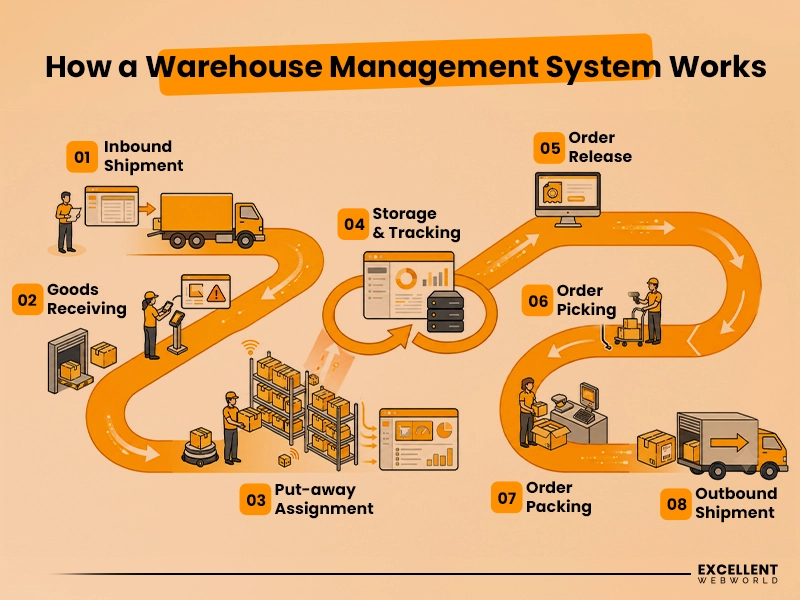 The entire data of the warehouse and distribution channel is stored and managed in a continuous loop in WMS. A worker scans an item, picks, and a pallet is moved. The system then records it and uses that data to guide the next move. Here is how that flow looks in practice, from inbound to outbound.
- Inbound: Before a truck arrives, the supplier sends an Advanced Shipping Notice (ASN) with all the required shipment details. This data allows WMS to prepare for the incoming goods, quantities, and items to expect.
- Receiving: Then, the staff scans the received ASN. If the staff encounters any mismatch in the item or quantity, then it is flagged at the dock only, rather than discovered at the end.
- Put-away: The system assigns a storage location based on rules. These rules include the size, SKU velocity, or storage zone. A robot or worker is assigned to place it there.
- Storage & Tracking: Every storage from bin to shelf has a live inventory count tied to the WMS. This is supported by IoT in logistics and supply chain management, which keeps sensor data flowing into the same dashboard.
- Order Release: Whenever an order is placed, the WMS checks the inventory availability, reserves the required stock, and generates a pick task.
- Picking: The WMS assigns the task to a picker or an automated vehicle (if available) and provides a fast and efficient route to the required locations.
- Packing: The items that are picked are then consolidated, packed, and weighed. In real time, the system verifies that the order is complete before it moves on.
- Outbound: The WMS then generates the shipping label and synchronizes carrier information. Once the pack leaves the dock, inventory counts are calculated and updated again.
Once the WMS marks those orders ready to ship, deciding how they actually get grouped and loaded onto a truck depends on which type of load planning software is handling that side of the operation.
How AI is Contributing to the Warehouse Management Flow
Do you think AI is just a separate add-on to the WMS workflow? No, it’s not. The way these modern platforms are scaling reflects the importance of AI in logistics, supporting several of the steps above:
- Forecasting: Predictive models analyze the demand patterns and signal what to reorder before a shelf runs empty.
- Slotting: Engines adjust storage assignments as the demand pattern shift is seen, rather than depending on a layout set.
- Pick-path Optimization: What algorithms perform is to adjust routes live based on congestion and order data.
- Computer Vision: Cameras used in the warehouse catch damaged items or items that seem a bit off quality during packing.
The term “AI-powered WMS” sounds like a new type of software. In practice, it refers to AI improving warehouse processes that a warehouse management system already manages.
Why Manual and Legacy Warehouse Processes No Longer Keep Up
Spreadsheets and paper-based tracking worked when warehouses handled a few hundred SKUs, and order volume stayed predictable. Here are the 3 things that changed in that math:
- MHI 2025 Annual Industry Report found 52% of supply chain leaders rate retaining warehouse labor as extremely challenging, and 45% say the same about hiring.
- Legacy on-prem platforms were not built for today’s tech stack. Many predate cloud infrastructure, API integrations, and mobile scanning, so plugging in modern warehouse automation technology means custom development work.
- The Bureau of Labor Statistics shows annual warehouse worker turnover at 36%, with replacing a single employee costing 25% to 150% of their salary. When the same experienced staff is not walking the floor every day, “tribal knowledge” about where things are stored stops being a viable inventory system.
Legacy tracking tells you what already happened: what shipped yesterday, what sat in a bin last week. Modern WMS platforms are shifting toward telling you what is about to happen instead:
- Flag a likely stockout three days before it hits, not after
- Reroute a pick path before congestion builds up on the floor
- Catch a slotting mismatch before it slows down picking altogether
That shift matters. Most facilities today report inventory accuracy in the 85% to 90% range, according to recent supply chain industry surveys. The missing 10% to 15% is often phantom inventory, stock that exists in the system but is not physically on the shelf, and it drives lost sales and unnecessary reordering directly. Predictive tools close that gap by catching discrepancies before they compound.
Warehouse Management System Features & Functionalities (With AI Advancement)
Every WMS, regardless of vendor, is built around the same core functions. How well a platform executes each one is usually what separates a good system from a mediocre one.
| Warehouse Function | Traditional Approach | AI Upgrade |
|---|---|---|
| Receiving | Manual verification against POs, discrepancies caught late | Auto-matching against ASNs/POs, flags mismatches instantly |
| Inventory Tracking | Periodic manual counts, delayed visibility | Real-time tracking (RFID/IoT) with live stock status |
| Inventory Planning | React to stockouts after they happen | Demand forecasting predicts reorder timing & quantity |
| Put-Away & Slotting | Fixed rules, rarely revisited | Dynamic slotting shifts locations as sales patterns change |
| Order Picking | Static pick paths | AI recalculates the fastest route in real time |
| Quality Control | Manual spot checks | Computer vision catches damage/mismatches automatically |
| Equipment Upkeep | Fix it when it breaks | Predictive maintenance flags failures before they happen |
| Reporting | Build a report, wait, analyze | Ask a question in plain language, get an instant answer |
| Labor Management | Manual shift & task planning | Live productivity tracking with smart task assignment |
| Shipping & Packing | Manual carrier/label selection | Auto-selection + weight checks to catch errors pre-label |
5 Interesting Benefits of a Warehouse Management System
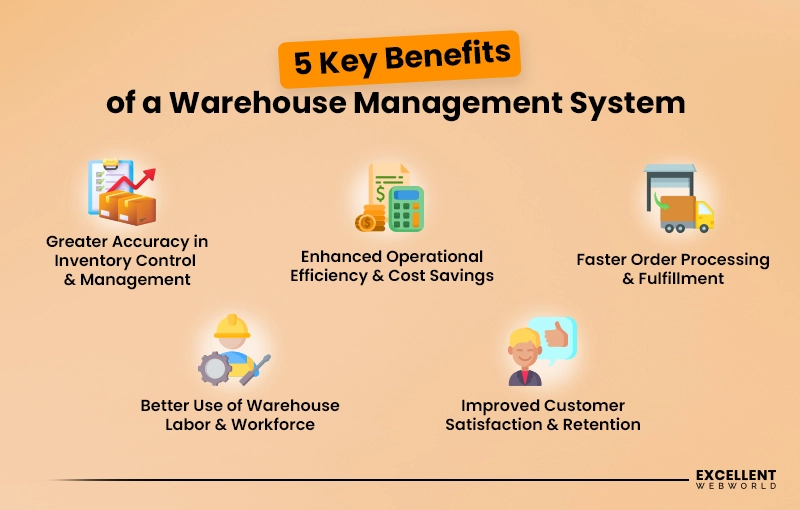
Implementing the best warehouse management system can improve accuracy and speed up logistics processes, improving overall ROI. The components of a warehouse management system help keep everything organized, from inventory to shipping. Looking for the best warehouse management system software? It’s the key to running a smoother, more effective logistics operation.
If you are wondering what effect it would have on your business if you decided to own a logistics warehouse management system, consider the reasons below for logistics software development.
1. Accuracy in Inventory Control & Management
Real-time tracking closes the gap between what your system says you have and what is actually on the shelf. Considering average inventory shrinkage runs around 1.4% of annual revenue, tighter accuracy has a direct line to your bottom line.
Example: During a routine scan, a homeware brand catches a mis-shelved SKU instead of catching it during a customer return. This saves the sale instead of losing it and business reputation.
2. Operational Efficiency Along With Cost Savings
Optimized pick paths and automated task assignment cut wasted movement on the floor. A distribution center that used to spend hours reconciling manual counts can redirect that labor toward fulfillment instead.
Example: A 3PL cuts its weekly cycle-counting time in half after switching from paper sheets to system-generated count tasks. It makes it easy and frees staff for peak-season picking.
3. Order Processing & Fulfillment with a Good Pace
When the system tells a picker exactly where to go instead of leaving them to search, order cycle times shrink. That matters more every year as same-day and next-day shipping become baseline customer expectations rather than a premium option.
Example: An electronics retailer trims its average pick-to-ship time from 45 minutes to under 20 after moving from paper pick lists to system-directed picking. It’s the same principle behind the AI freight forwarding platform we developed for a Netherlands client, where routing decisions that used to depend on someone’s memory now happen automatically with the routine data.
4. Better Use of Warehouse Labor & Workforce
With a live view of who is working on what, supervisors can rebalance staff to bottlenecks in real time instead of discovering a backlog at the end of the shift.
Example: A supervisor spots a packing station falling behind mid-shift and reassigns two pickers there instantly, rather than finding out at day’s end. We built similar real-time visibility into the HJM Truckers and Shippers App, where dispatchers reassign drivers the moment a bottleneck shows up instead of waiting on an end-of-day report.
5. Customer Satisfaction & Retention at its Best
Accurate stock counts mean fewer canceled orders and fewer “sorry, that’s actually out of stock” emails. For an online retailer, that consistency is often what turns a first-time buyer into a repeat one.
Example: A DTC brand cuts its out-of-stock cancellation rate noticeably after real-time stock counts stop overselling items that were already gone. That kind of accuracy was the goal behind this eCommerce shipping website we built, where stock visibility directly shapes whether a customer even sees an item as available.
Types of Warehouse Management Systems to Consider for Your Logistics
Whichever platform you choose, each one manages inventory and fulfillment tasks differently depending on business scale and technical setup.
| Types | What it Does | Capabilities | Examples | Best For |
|---|---|---|---|---|
| Standalone Warehouse Management System | Covers only core warehouse functions, without connecting to broader business systems like finance or CRM. | Inventory tracking, Receiving & put-away, Pick/pack/ship, Barcode scanning, Basic reporting, Cycle counting, Multi-bin location tracking, Order status alerts, Low-stock notifications, | Fishbowl Inventory Sortly | Small and medium-sized businesses |
| Cloud-Based Warehouse Management System | Runs on hosted infrastructure instead of on-site servers, letting businesses scale usage as order volume changes. | SaaS hosting, Real-time sync, Elastic scalability, Remote access, Auto-updates, eCommerce integrations, Multi-location visibility, Mobile app support, Subscription-based pricing, API connectivity | Zoho Inventory ShipBob | Businesses of all sizes without an in-house IT infrastructure |
| ERP-Integrated Warehouse Management System | Runs as a module inside a larger ERP suite, sharing one database with finance and sales instead of syncing separately. | Shared database, Unified reporting, Automated financial postings, Demand forecasting, Multi-entity support, Procurement integration, Multi-currency handling, Audit trail tracking, Role-based permissions | Microsoft Dynamics 365 NetSuite ERP | Large enterprises |
| Supply Chain Execution (SCE) Suite | Combines WMS, transportation, and labor management into one platform to coordinate the full supply chain. | WMS + TMS + LMS, End-to-end visibility, Route optimization, Labor tracking, Risk & compliance management, Carrier rate shopping, Vendor performance monitoring, Cross-docking support, Network-wide analytics | SAP SCM Oracle SCM Cloud | Businesses with complex supply chain needs |
| Open-Source Warehouse Management System | Gives full access to source code so teams can customize features or self-host rather than depend on a vendor. | Source code access, Self-hosting, Custom integrations, Community plugins, Developer-driven customization, No licensing fees, Modular architecture, Custom workflow scripting, Active developer community | Odoo Inventory ERPNext | Teams with technical resources wanting deep customization |
WMS vs. WES vs. WCS: What’s the Difference?
Let’s help you bifurcate and understand the warehouse management system, warehouse execution system, and warehouse control system:
| System | What it Does | Where it Sits | Where AI Shows Up |
|---|---|---|---|
| Warehouse Management System (WMS) | Manages inventory, orders, and high-level task planning | The strategic layer, deciding what needs to happen | Demand forecasting, dynamic slotting, natural-language reporting |
| Warehouse Execution System (WES) | Coordinates and sequences tasks between the WMS and the equipment on the floor | The middle layer, translating strategy into execution | Real-time task interleaving between human pickers and robots |
| Warehouse Control System (WCS) | Directly controls physical equipment like conveyors, sorters, and automated storage systems | The operational layer, talking directly to machines | Predictive maintenance alerts from equipment sensor data |
A small warehouse with manual picking may only ever need a WMS. A highly automated facility running conveyors, sorters, and robots typically needs all three working together, with the WMS setting priorities, the WES sequencing tasks, and the WCS executing them at the equipment level.
1. Warehouse Management System (WMS)
decides what should happen: which order gets picked next, where inventory should be stored, and how labor should be allocated.
2. Warehouse Execution System (WES)
sits between the WMS and the physical equipment, interleaving tasks across humans and machines so nothing sits idle waiting on the other. It is most relevant in warehouses running a mix of manual labor and automation.
3. Warehouse Control System (WCS)
talks directly to the hardware. If a conveyor needs to start, stop, or reroute a package, the WCS is issuing that command at the equipment level.
Challenges in WMS Implementation (and How to Overcome Them)
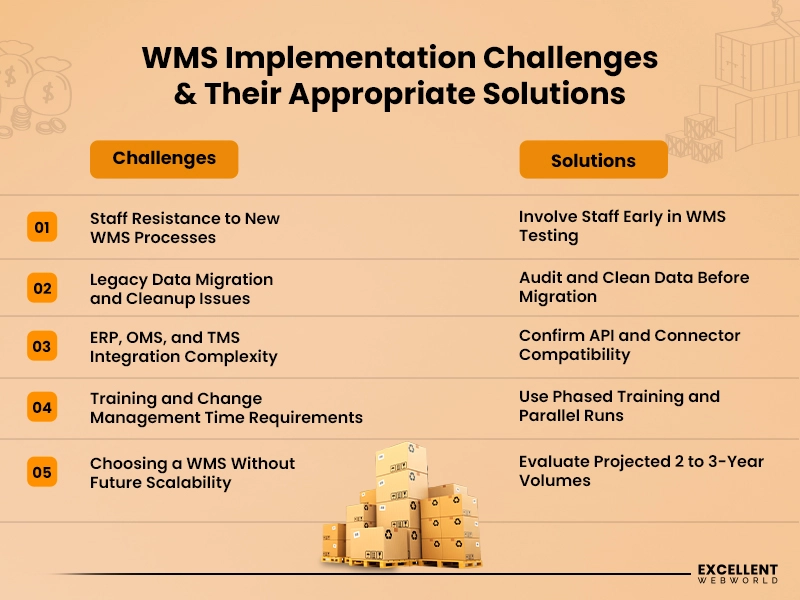 No doubt WMS comes with benefits like improving daily stock control and live data visibility, but it also introduces operational hurdles. Let’s go through each one in detail.
1. Resistance to Change Among Warehouse Staff
Workers who have run a process a certain way for years often push back on new software, especially handheld devices replacing paper lists.
Solution Involve floor staff in testing before full rollout, and frame the system as reducing their workload rather than monitoring them.
2. Migration & Cleanup From Legacy Systems
Years of inconsistent data entry mean SKU records, bin locations, and unit-of-measure conventions rarely transfer cleanly.
Solution Run a data audit and cleanup pass before migration, not during it. Fixing bad data inside a live system multiplies the work.
3. Integration Complexity With ERP/OMS/TMS
A WMS that cannot talk cleanly to your existing order management or transportation systems creates manual workarounds that defeat the purpose of automating in the first place.
Solution Confirm API or connector support for your specific ERP and OMS before signing a contract, not after implementation starts.
4. Underestimating Training & Change Management Time
Teams often budget for software cost but not for the weeks it takes staff to reach full productivity on a new system.
Solution Build a phased training plan with a parallel run period, where the old and new processes overlap briefly instead of switching overnight.
5. Choosing a System That Doesn’t Scale
A platform that fits your current order volume can become a bottleneck within a year or two of growth, forcing a costly second migration.
Solution Evaluate vendors against your projected volume 2 to 3 years out. Make sure you are not just evaluating where you stand today.
How Much Does a Warehouse Management System Cost?
WMS pricing varies widely based on deployment model, business size, and how much automation you are running alongside it.
| Deployment | Typical Cost Range | Notes |
|---|---|---|
| Small business cloud (SaaS) | $200 to $600 per month | Covers core inventory, picking, and shipping functions |
| Mid-market cloud (SaaS) | $500 to $2,000+ per month | Adds labor management, advanced reporting, and multi-user access |
| Enterprise cloud (SaaS) | $15,000 to $50,000+ per month | Multi-site support, advanced analytics, AI-driven features |
| On-premise (mid-market) | $100,000 to $500,000 upfront | Perpetual license, plus 15% to 25% annual maintenance fee |
| On-premise (enterprise/Tier 1) | $500,000 to $2 million+ upfront | Custom implementation for large, complex operations |
Beyond the software license itself, budget for implementation (commonly $1,000 to $30,000 depending on integration complexity, especially if you’re also connecting a freight management system on the transportation side), staff training, and hardware like scanners and mobile devices. Most businesses see a return on their WMS investment within 6 to 12 months, largely through reduced labor waste and fewer inventory errors.
Cloud deployment generally works out 30% to 40% cheaper than on-premise over a 3 to 5 year period for small and mid-sized businesses, mainly because hosting, maintenance, and updates are bundled into the subscription instead of being billed separately. It’s the same flow that pushes most growing logistics operations towards managing cloud services and solutions instead of running and maintaining their own servers.
How to Build a Warehouse Management System for Your Business
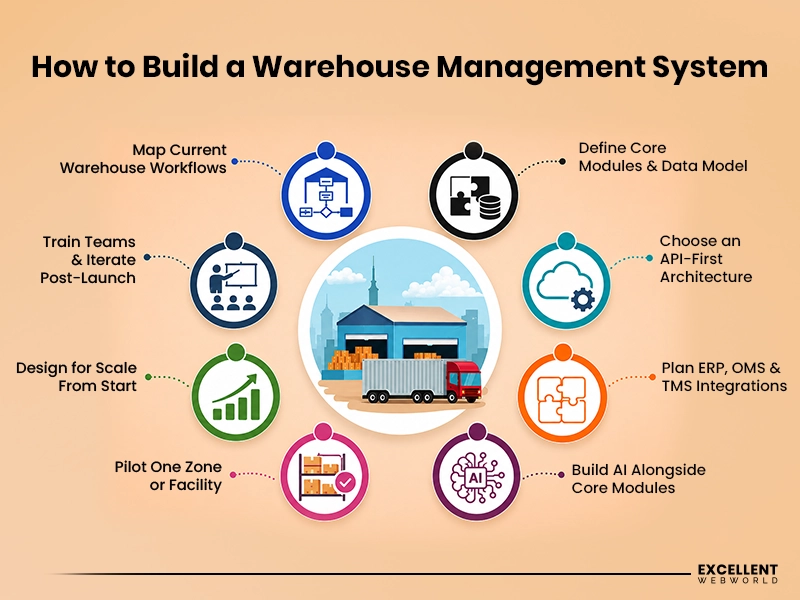 Building a WMS in 2026 looks different from how it did even 3-4 years ago. Businesses used to build the core system first and treat AI as an add-on for later. That order has flipped. Most teams now build the AI layer alongside the core modules from the start. Here’s what a build actually looks like, step by step.
Step 1. Map Your Current Warehouse Workflows
If you want to build a reliable warehouse management system. You need to have the direct answers to these questions before writing any code.
- Where does inventory get stuck or double-handled today?
- On which shift does it happen most?
- Which tasks still run in someone’s memory instead of a system record?
- What do staff already do manually that a system could flag automatically?
- Which system owns SKU master data, and which one owns unit-of-measure conversions, if it’s the same system or not?
- How often does the mismatch between those two only surface during a cycle count?
Shadow the floor across a full cycle, and include a peak day and a slow one. Answers gathered only in calm conditions won’t hold up once volume spikes. You need to log every manual override with a timestamp and a reason; those overrides are your clearest map of where a rigid system will get worked around instead of used.
Step 2. Figure Out Your Core Modules & Data Model
Scope inventory tracking, receiving and put-away, picking, packing, shipping, and labor management as the non-negotiable foundation. Once these are fixed, you need to define your code entities, which include:
| Entity | Tied To | Example |
|---|---|---|
| SKU | One or more units of measure | A case, a unit, a pallet |
| Bin or Location | A zone and a capacity limit | Fast-pick zone, bulk storage |
| Order | One or more line items and a status | Reserved, picked, shipped |
| Task | A worker or a piece of equipment | Pick task, put-away task |
If you carry regulated or perishable goods, decide now how much and how serial tracking attaches to the stock-keeping unit entity. This is one decision worth over-planning: once live orders depend on the structure you chose, changing it means an expensive partial data migration.
Step 3. Choose a Composable, API-First Architecture
Ensure that you are developing inventory, forecasting, and slotting as separate services. Why? So that each can scale based on its workload without creating dependencies across the system.
- Containerize each service, commonly with Docker, and orchestrate with Kubernetes so they scale independently.
- Connect them over REST or gRPC for direct calls.
- Route anything time-sensitive, a pick confirmation, a stock adjustment, a reorder trigger, through an event stream like Kafka instead of a direct database write.
- Keep the AI and forecasting service as its own consumer of that stream, rather than querying the transactional database directly, so model computation never competes with live picking traffic.
- Version each service’s API independently, so a breaking change to forecasting doesn’t force a coordinated redeploy of everything else.
This is what lets you retrain your forecasting model without touching picking logic at all. Older monolithic platforms couldn’t do that without re-testing the whole system for even a small change, which is not the right option.
Step 4. Plan ERP, OMS, and TMS Integrations Early
| Protocol | Where it Fits | Common Failure Point |
|---|---|---|
| REST API | Direct connection where ERP or OMS supports it | Rate limits during peak sync windows |
| EDI (850, 856, 810) | Older ERPs or supplier networks are still running EDI | Document format mismatches between trading partners |
| Webhooks | Carrier and TMS updates pushed in real time | Missed events if your endpoint is down when one fires |
From the start, you need to build every integration with idempotency keys and a retry queue. A dropped connection during an inventory sync happens routinely. And without that safeguard, a retried sync can double-count stock or drop it, quietly creating a discrepancy nobody catches until the next count.
Step 5. Build the AI Layer Alongside Core Modules
The table above shows what changes at a glance. Here is what each piece actually requires to work in production.
- Forecasting: It needs 12 to 24 months of SKU-level sales data with seasonality built in. Gradient-boosted models like XGBoost or a purpose-built option like Prophet both hold up here, but the model is only half the work; it needs the kind of data science and engineering that builds a proper feature store, so inputs stay consistent between training and live predictions, or accuracy drifts within weeks.
- Dynamic Slotting: It works as a constraint-optimization problem, not a one-time layout decision. Re-run it daily or weekly so a SKU that suddenly trends doesn’t sit in a bad location for a month.
- Agent Layer: It needs explicit guardrails before it touches anything live: dollar thresholds, SKU categories, or order types it’s allowed to act on alone. Everything outside those bounds goes to a person, and the bounds themselves should be reviewed, not set once and forgotten.
- Natural-language Reporting: It should run as retrieval-augmented generation over your own operational data. A general-purpose model without that grounding will answer confidently and sometimes wrongly, which is worse than no answer at all.
Step 6. Pilot on One Zone or Facility
Run the pilot for a minimum of two weeks, covering one peak period and one slow one. Before expanding, you need to check all of these:
If any threshold is missed, extend the pilot. Rolling out on schedule anyway usually costs more to fix later than the extra weeks would have cost now.
Step 7. Architect for Scale From the Start
Design for 5x your current order volume. That means horizontal scaling through your container orchestration layer, so you add capacity by spinning up instances rather than upgrading a single server, database partitioning by warehouse or region if you run multiple sites, and a load test at your actual target volume before go-live.
This is DevOps services territory in the truest sense, the orchestration, partitioning, and load-testing work that decides whether your architecture actually holds under real order volume.
Skipping that test is the single most common reason a system that ran fine in the pilot starts timing out the moment real order volume hits it. The composable architecture from Step 3 is what turns future scaling into a configuration change instead of a rebuild.
Step 8. Train Teams & Iterate Post-Launch
Set a retraining cadence for your AI models, monthly or quarterly, depending on how fast demand patterns shift, and route floor staff overrides back into the training data. Three signals mean the system needs attention, not just a routine check-in:
- Forecast error creeping past the Step 6 threshold, even if it’s technically still passing
- Pickers manually correcting the same suggested route or bin regularly
- A growing gap between what the AI recommends and what staff actually do, with nobody flagging it
Model drift deserves the closest attention here. A forecasting model accurate at launch degrades quietly as your product mix or seasonality shifts. It won’t throw an error. The numbers just get a little less right every week until someone notices they’re visibly off.
The Future of WMS: AI, IoT, and Cloud in 2026 and Beyond
These are the shifts already shaping how newer warehouse management systems are being designed and built. Some of this is already familiar if you’ve worked with fleet management technologies for coordinating vehicles or robots. It’s the same orchestration logic that is now showing up inside warehouse task assignments.
| Trend | What’s Changing | Why it Matters to You |
|---|---|---|
| Agentic AI (for Autonomous Exception-Handling) | Systems take limited action on their own instead of just flagging a problem for a human | Fewer mid-shift bottlenecks waiting on manual approval |
| IoT Sensor Networks (for Real-Time Condition & Location Data) | Connected sensors track real-time condition and location data, not just inventory counts | Critical for food, pharma, and cold-chain warehouses, monitoring temperature and humidity |
| Digital Twins (for Warehouse Layout & Workflow Simulation) | Layout and workflow changes get tested in a digital replica of your warehouse first | Cuts the risk of a costly redesign that does not work on the actual floor |
| AI-Orchestrated Robotics & AMR Fleets (for Live Fleet Task Balancing) | AI balances tasks across an entire robot fleet in real time, not fixed, pre-programmed routes | Higher throughput without adding headcount |
| Cloud-Native, API-First WMS (for Flexible System Integration) | New platforms are built cloud-native with open APIs as a baseline, not a premium add-on. | Easier to plug in new tools as your tech stack grows |
You do not need every one of these on day one. What matters is choosing (or building) a system architected to add them later without a full rebuild.
Take the Next Step With an AI-Powered Warehouse Management System
The above article should have helped you understand how logistics warehouse management systems improve the efficiency of day-to-day operations. However, one critical aspect of this process is understanding the factors that reduce the cost of logistics warehouse management system development, especially for larger operations already juggling enterprise fleet management across multiple sites. Excellent Webworld is an experienced software development company with logistics industry expertise.
We have over 15+ years of experience providing AI-integrated software development services. Our team of experts has successfully developed high-performance logistics software solutions that integrate advanced AI technologies. With more than 900 successful projects, our experts have catered to different client needs in app development.
We are a leading logistics software development company that offers end-to-end WMS development and integration, built to improve warehouse management, automation, and efficiecy across your logistics operations and supply chain. Contact us now to learn more about our solutions.
Frequently Asked Questions

Article By

